
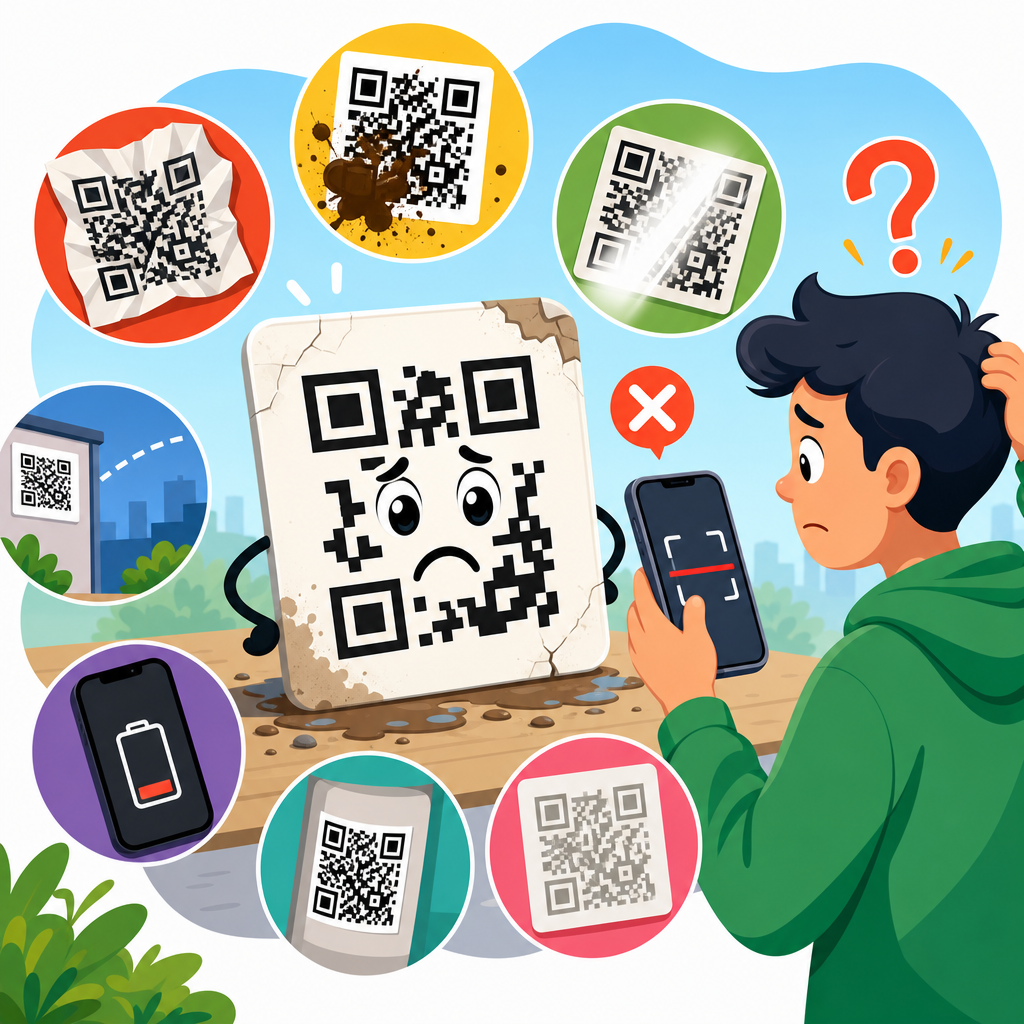
QR codes fail for predictable reasons, and most of them can be prevented before anything goes to print. In QR Code Testing & Quality Assurance, failure means a code cannot be scanned quickly, consistently, and accurately under real conditions. That sounds simple, but in practice it depends on symbol structure, print quality, materials, contrast, placement, lighting, device capability, and landing-page behavior after the scan. I have seen campaigns miss response targets not because the offer was weak, but because the code was too small on corrugated packaging, laminated with glare, or redirected to a broken mobile page. A working QR code is not just a graphic; it is a machine-readable symbol inside a physical and digital system.
To understand what makes a QR code fail, it helps to define the moving parts. The code itself is a two-dimensional matrix barcode standardized under ISO/IEC 18004. A scanner, usually a smartphone camera with decoding software, must detect the finder patterns, interpret the module grid, correct errors if damage exists, and resolve the encoded data. Quality assurance is the discipline of verifying that process end to end. In print production, that includes preflight checks, contrast measurement, proofing, substrate review, and scan testing across distances and devices. In digital deployment, it includes redirect testing, page-speed checks, analytics validation, and monitoring after launch. If any link in that chain breaks, users experience delay, misreads, or complete failure.
This matters because QR codes now sit on packaging, menus, direct mail, displays, labels, tickets, and industrial parts. They bridge offline attention to online action, so every failed scan wastes media spend and user intent. The cost is measurable: lower conversion rates, customer frustration, support inquiries, and in regulated settings, operational risk. In healthcare, manufacturing, and logistics, scan reliability can affect traceability and compliance, not just marketing performance. That is why a hub article on QR Code Testing & Quality Assurance should start with the central truth: successful codes are engineered, not guessed. The sections below explain the main failure modes, how to test for them, and what standards and methods consistently prevent them.
Print and design errors that make QR codes unreadable
The most common reason a QR code fails is poor symbol design translated into poor print output. Size is the first checkpoint. A code with modules that print too small will blur together, especially on absorbent paper, textured labels, or low-resolution devices. A practical rule many production teams use is to size the code based on expected scanning distance, often near a 10:1 ratio between viewing distance and symbol width, then verify with live tests. That rule is directional, not absolute, because module count, camera quality, and environmental conditions change the result. Dense codes containing long URLs or vCard data require more modules, so they need larger physical dimensions than short URL codes for equal scan reliability.
Contrast is the second major variable. The safest combination remains dark modules on a light background, ideally close to black on white. Failures rise when designers reverse the color scheme, reduce contrast for aesthetic reasons, or place the symbol over photography, gradients, metallic ink, or transparent stock. Many smartphone cameras compensate well, but compensation is not quality assurance. A code may scan in ideal office lighting and fail under store fluorescents or outdoor glare. Quiet zone violations are equally destructive. The clear margin around the code helps software isolate the symbol; when logos, text, cut lines, or patterns crowd that zone, detection slows or stops entirely.
Brand customization also introduces risk. Rounded modules, heavy logo overlays, custom shapes, and decorative frames can work, but only within tested limits. Error correction does not make the code indestructible; it gives a finite tolerance for missing or altered modules. I routinely advise teams to treat customization as a budget that can be spent only after baseline readability is proven. File handling matters too. Raster artwork exported at low resolution, resampled in presentation software, or compressed by online design tools often creates edge artifacts that scanners interpret poorly. Vector output is preferred for print, with controlled scaling and production proofs reviewed at actual size.
Material, finishing, and placement problems in the real world
A QR code can be technically correct and still fail because the material beneath it or the finish above it interferes with scanning. Substrate selection changes edge sharpness, ink spread, reflectivity, and durability. Uncoated paper can feather fine modules. Corrugated board adds uneven surface texture. Flexible films can distort the square geometry when wrapped around curved containers. Metalized labels, holographic effects, and spot varnishes may look premium while degrading readability. In outdoor use, UV exposure, abrasion, condensation, and dirt gradually reduce contrast. Testing must therefore include not just first-day scans but scans after handling, shipping, and environmental stress.
Placement is another underestimated cause of failure. Codes wrapped around bottle shoulders, folded over carton seams, placed near perforations, or positioned on the underside of shelf wobblers are common examples. Even when the printed image is sharp, scanners struggle if the symbol bends across a curve or sits where users cannot easily frame it. Human factors matter: if a shopper must crouch, rotate packaging awkwardly, or fight glare from overhead lights, scan rates fall. Good quality assurance includes line-of-sight review at the point of use. For packaging, I test codes on filled containers, not flat mechanicals, because distortion and highlight reflection often appear only after production.
The table below summarizes frequent physical failure points and the most effective preventive action.
| Failure point | What happens | Best preventive action |
|---|---|---|
| Code printed too small | Modules merge or cannot be resolved at normal distance | Increase symbol size and test at expected scan distance on target devices |
| Low contrast colors | Camera cannot separate modules from background reliably | Use dark-on-light combinations and verify under multiple lighting conditions |
| Insufficient quiet zone | Scanner fails to isolate the symbol from nearby graphics | Preserve clear margins on all sides throughout design and trimming |
| Gloss or laminate glare | Specular reflection blocks finder patterns and modules | Use matte finishes or relocate the code away from reflective surfaces |
| Curved or distorted placement | Grid geometry warps and decoding slows or fails | Place on flat panels whenever possible and test on final assembled products |
| Damaged or dirty surface | Missing modules exceed error-correction tolerance | Choose durable materials and test after abrasion, moisture, and handling |
Data, destination, and mobile experience failures after the scan
Many teams stop testing once the camera opens the URL, but a QR code still fails if the destination experience breaks. The encoded data should be minimal and precise. Short URLs or dynamic QR codes reduce module density and improve print robustness, while also making destination changes possible without reprinting. Problems begin when marketers encode long tracking strings directly into static codes, producing dense symbols that require larger print areas. Even if the code scans, redirects can fail because of expired domains, DNS errors, SSL certificate issues, broken UTM structures, app deep-link conflicts, or mobile pages blocked by robots settings or security middleware.
Mobile usability is inseparable from scan success. Users judge the code by the page they reach, not the symbol they scanned. If the landing page loads slowly on cellular networks, overlays the content with consent banners, or opens a desktop layout with tiny tap targets, the campaign effectively failed. Core Web Vitals are not the only benchmark, but they are useful indicators of whether the post-scan experience is responsive. I have seen beautifully printed in-store codes underperform because they opened PDF files on mobile data or triggered generic homepages instead of context-specific landing pages. Quality assurance should include device testing on iOS and Android, across native camera apps and common in-app browsers.
Analytics must also be verified before launch. Dynamic code platforms, tag managers, and attribution tools can create duplicate sessions, missing events, or inconsistent campaign naming. That matters because teams may misdiagnose low engagement as a creative problem when the real issue is data collection. A reliable workflow checks destination URL status codes, redirect chains, canonical behavior, event firing, and regional availability. If the code appears on products distributed across countries, language routing and geofencing need review as well. A scan that leads to a blocked page, wrong locale, or out-of-stock item is a failure from the user’s perspective, even when the barcode itself decodes perfectly.
How to test QR codes systematically before and after launch
Effective QR Code Testing & Quality Assurance is a repeatable process, not a one-time scan from one phone. Start with preproduction validation. Confirm the encoded payload, symbol version, and error-correction level. Review size, quiet zone, contrast, and color choices against the final design, not an isolated artwork file. Output a proof at actual size on the intended printer and substrate whenever possible. Scan with multiple devices at realistic distances and angles in representative lighting. For packaging, test on mockups or finished samples, because folds, curves, and finishes alter readability. For signage, test from the actual user position, accounting for mounting height and ambient glare.
Formal verification adds another layer. Industrial barcode verifiers grade symbol quality using standards-based measures such as contrast, modulation, axial nonuniformity, grid nonuniformity, and unused error correction. Consumer smartphone testing remains essential, but verifier grades help identify borderline print conditions before they become field failures. The exact grading method varies by use case, and some organizations align processes with ISO/IEC 15415 for two-dimensional symbol print quality. In my experience, verifier data is especially valuable when codes are printed at high volume across multiple plants or vendors, because it turns subjective opinions like “looks sharp” into measurable acceptance criteria.
Post-launch monitoring is equally important. Sample scans should continue after production runs, store placement, environmental exposure, and website updates. Dynamic QR code dashboards can reveal sudden traffic drops that suggest print, placement, or destination issues. Customer service reports, retail field audits, and session recordings often uncover problems analytics alone misses. I recommend maintaining a simple QA checklist for every deployment: encoded content verified, destination live, redirects tested, mobile page approved, analytics firing, print proof passed, real-world scan test passed, and monitoring owner assigned. That discipline prevents the common pattern where a code worked at approval stage but quietly failed after a packaging revision or web release.
Building a dependable quality assurance framework for every QR deployment
The strongest QR programs treat reliability as a cross-functional responsibility shared by design, print production, packaging engineering, web teams, and analytics owners. That is the practical lesson behind what makes a QR code fail: no single team controls all failure points. Designers influence contrast and quiet zones. Prepress operators manage output fidelity. Production teams choose substrates and finishes. Digital teams control redirects, page speed, and event tracking. A dependable framework documents requirements early, assigns approval checkpoints, and defines pass or fail criteria before anyone debates aesthetics. This hub should anchor those related topics, because testing is the connective tissue across design, printing, and materials decisions.
If you remember only a few principles, make them these. Keep the payload lean. Print at a size appropriate to module count and scan distance. Preserve strong contrast and a clean quiet zone. Avoid reflective finishes and distorted placement. Test on the real material, in the real environment, with multiple devices. Then verify the destination experience, not just the scan itself. QR codes succeed when physical production and digital delivery are tested as one system. Use that standard for every packaging run, mailer, sign, label, or display you launch, and you will catch most failures before your audience ever sees them. Build your next QR project around a formal QA checklist, and reliability will stop being accidental.
Frequently Asked Questions
What are the most common reasons a QR code fails to scan?
The most common QR code failures come down to a handful of predictable issues: poor contrast, incorrect sizing, print distortion, damaged surfaces, bad placement, and weak testing before launch. A QR code may look fine to the human eye and still fail because scanners depend on clear module edges, strong differentiation between dark and light areas, and enough quiet space around the symbol to detect it properly. If the code is too small, printed on reflective packaging, wrapped around a curved bottle, or placed where glare and shadows interfere with the camera, scan reliability drops quickly.
Another major cause is using the wrong file type or production process. Low-resolution artwork, excessive compression, or resizing a raster image can blur the square modules and make the code unreadable. Design changes can also introduce problems, especially when brands add colors, logos, gradients, frames, or custom shapes without checking whether the underlying symbol still meets scanning tolerance. Even when the code itself is technically readable, the experience can still fail if it sends users to a broken URL, a slow mobile page, or content blocked by geography, device type, or security settings. In practice, a QR code fails when the full real-world journey breaks down at any point, from symbol detection to landing-page load.
How do print quality and materials affect QR code performance?
Print quality has a direct impact on whether a QR code scans quickly and consistently. QR codes rely on crisp, well-defined modules, so anything that causes dot gain, ink spread, feathering, banding, smearing, or loss of edge sharpness can reduce readability. On press, small production variations that seem minor in general graphics can be significant for machine reading. If dark elements fill in, light spaces close up, or alignment shifts during printing, the code may become difficult for some devices to interpret. This is especially true for small symbols, dense data content, or codes printed at low quality on absorbent stock.
Material choice matters just as much as print execution. Glossy labels can create glare under retail or outdoor lighting. Flexible packaging can wrinkle and distort the grid. Textured paper, corrugated surfaces, metallic films, transparent substrates, and curved containers can all interfere with symbol detection. A code placed across a seam, fold, perforation, or shrink-wrap distortion zone is more likely to fail under normal handling. Environmental exposure also matters. Moisture, abrasion, UV fading, dirt, and scratching can degrade the symbol after production. The safest approach is to match the code size, error correction level, ink coverage, and placement to the actual substrate and use case, then test printed samples under the same conditions in which customers will scan them.
Does QR code design customization make scanning less reliable?
It can. Customization is not automatically a problem, but every design change uses up some of the code’s tolerance for real-world scanning conditions. Standard black-on-white QR codes remain the most reliable because they provide strong contrast and preserve the geometric structure scanners expect. Once you introduce brand colors, embedded logos, rounded modules, decorative frames, inverted color schemes, or busy backgrounds, you increase the chance that some devices or scanning environments will struggle. A design that scans in a studio under perfect light may fail in a store aisle, on a moving package, or on an older phone camera.
The biggest design risks are reduced contrast, interference with finder patterns, and insufficient quiet zone. The three large corner markers must remain easy to detect, and the background around the code should stay clean and uninterrupted. If a logo covers too much of the data area, if light modules are not actually light enough, or if background graphics create visual noise, recognition speed and accuracy can drop sharply. Error correction helps, but it is not a guarantee and should not be treated as permission to over-design the symbol. The best practice is to keep customization conservative, generate the code at the final intended size, and test across multiple devices, distances, lighting conditions, and print samples before approving production.
How important are size, placement, and scanning environment for QR code success?
They are critical. A technically valid QR code can still fail if it is too small for the expected scanning distance, placed at an awkward angle, or used in an environment with poor lighting or excessive motion. Size affects how easily a camera can resolve the code’s modules. As a general rule, the farther away people will be when scanning, the larger the symbol needs to be. A code on product packaging viewed from arm’s length can be much smaller than one on a poster, sign, or billboard intended to be scanned from several feet away. Dense codes that contain more data also need more space because their modules become smaller and harder to capture cleanly.
Placement is equally important. Codes should not be positioned near folds, corners, caps, curves, seams, or other areas likely to distort the image. They should be accessible to a user holding a phone naturally, without requiring an extreme viewing angle or putting the camera into shadow. Environmental conditions add another layer: glare, backlighting, tinted surfaces, weather exposure, low indoor light, and movement all affect scan speed. Audience context matters too. A code on public transit, at a drive-through, behind glass, or high on a shelf may be visible but not practically scannable. Strong QR performance comes from designing for actual user behavior and physical conditions, not just checking that the symbol works on a desk.
What should be tested before printing or launching a QR code campaign?
Everything that can fail in the real world should be tested before launch. Start with the symbol itself: confirm the encoded destination is correct, the QR code has adequate contrast, the quiet zone is intact, and the artwork is being used in a format that preserves sharpness at final output size. Review whether the code contains more data than necessary, because overly dense symbols are harder to scan. Then test proofs and production samples rather than relying only on digital previews. A code that works on screen may perform very differently once printed on the actual substrate with the actual finishing, color profile, and press conditions.
Device and context testing are just as important. Scan with multiple phones, camera qualities, operating systems, and QR reader apps under different lighting conditions and from realistic distances and angles. Test fresh prints as well as samples that have been handled, bent, or exposed to the environment they will face. Finally, verify the post-scan experience: the URL should resolve instantly, the page should be mobile-friendly, secure, fast, and relevant, and any redirects, analytics tags, app deep links, or regional rules should work correctly. Many “QR failures” are actually landing-page failures. The most reliable campaigns treat QR code quality assurance as end-to-end testing, from symbol generation and print production all the way through scan behavior, page load, and user conversion.





