
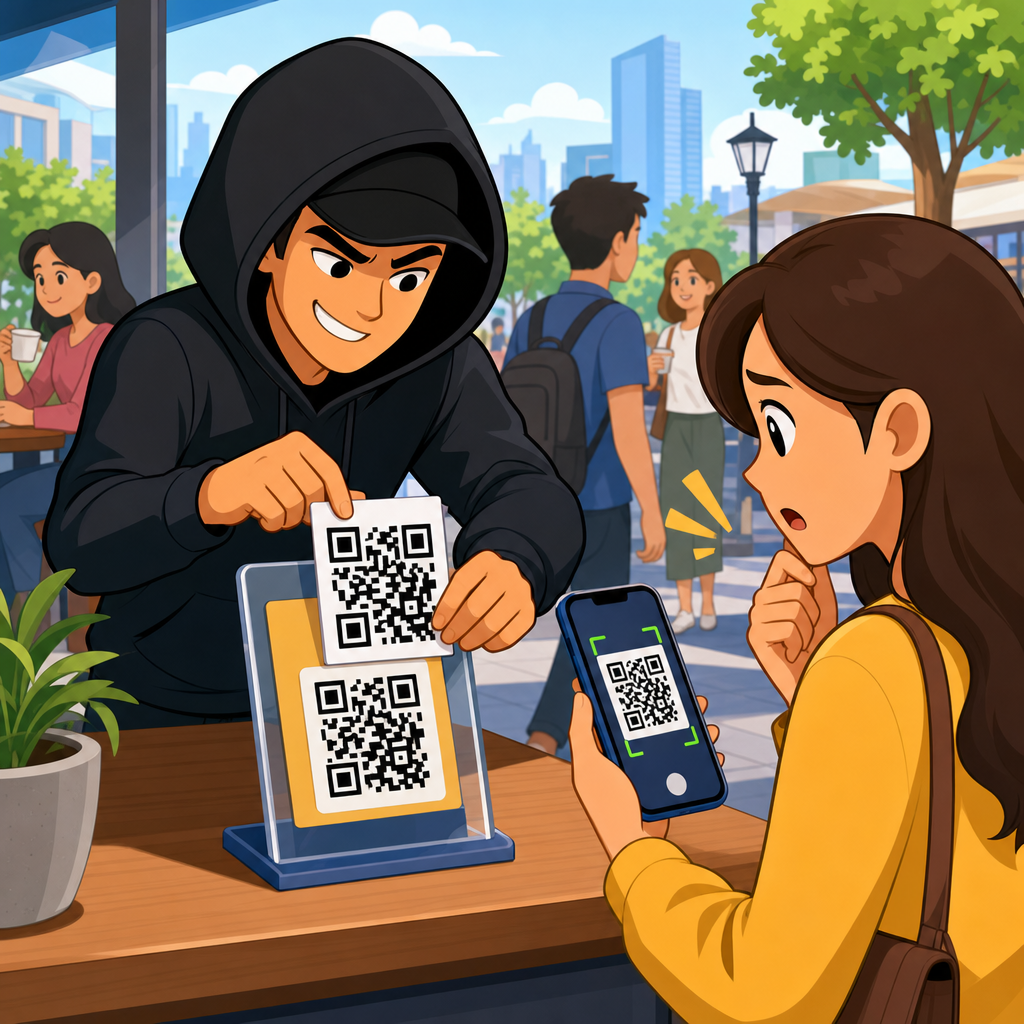
QR code fraud in public places has grown from an occasional nuisance into a reliable criminal tactic, because people now scan codes to pay parking fees, open restaurant menus, join public Wi-Fi, download event tickets, and verify products with almost no hesitation. A QR code, short for Quick Response code, is a two-dimensional barcode that stores a destination such as a website URL, payment request, app download link, contact card, or authentication token. The convenience is real, but so is the risk: a printed square can hide a malicious destination just as easily as a legitimate one, and most people cannot tell the difference by looking at it.
I have investigated QR campaigns for retail chains, municipal venues, and transit operators, and the pattern is consistent. Attackers exploit trust in physical spaces. When a code appears on a parking meter, a café table, a concert poster, or a utility notice, users assume the surrounding environment has already been vetted. That assumption is exactly what criminals need. They place fake stickers over genuine codes, print convincing signs, or redirect victims to cloned payment pages designed to steal card data, banking credentials, or one-time passcodes.
This matters because QR code scams sit at the intersection of digital phishing and real-world social engineering. The victim often believes the action is routine, urgent, and local. A traveler trying to pay for parking before a meter expires is less cautious than someone clicking a random email link. Public-place fraud also scales cheaply. One printed sticker can target hundreds of people in a day, and the attacker does not need to speak to anyone directly. For organizations, the costs include chargebacks, support volume, reputational damage, and legal exposure if poor controls made the fraud easy.
As a hub for QR code scams and fraud, this article explains how public-place QR fraud works, where it appears, what warning signs matter, how criminals profit, and what individuals and organizations should do next. It also connects the wider issue of QR code security and privacy by showing that a harmless-looking code can trigger payment theft, credential phishing, malware delivery, account takeover, and data harvesting in a single flow.
How QR Code Fraud in Public Places Works
Most public-place QR fraud follows a simple chain: placement, scan, redirection, extraction, and monetization. First, the attacker places a fraudulent code in a location where people expect QR interactions. Common examples include parking kiosks, EV charging stations, restaurant ordering systems, museum labels, transit shelters, shared bikes, parcel lockers, and bulletin boards. Second, the victim scans the code with a phone camera. Third, the code opens a website or payment interface controlled by the attacker. Fourth, the victim enters valuable information such as card details, login credentials, or mobile wallet authorization. Finally, the criminal monetizes the data through direct theft, resale, account access, or follow-on scams.
The reason this method works so well is that QR codes suppress visible context. In an email, a careful user can hover over a link on a desktop and inspect the destination. In the physical world, people often scan first and evaluate later. Mobile screens also limit visibility. Some camera apps show only a shortened preview, and many users click immediately. Attackers exploit this behavior by using domains that mimic trusted brands, such as replacing letters with similar characters, adding geographic terms like “cityparking,” or inserting extra words that look official.
Another common tactic is sticker replacement. I have seen fake codes placed directly over authentic parking and donation codes with enough visual similarity that only a close inspection revealed tampering. In busy environments, a sticker with the correct logo and color palette is often sufficient. Criminals also use freestanding placards that claim a permanent code is temporarily unavailable, pushing people to scan a “new” one. Because many public venues outsource payment and ticketing to third parties, users are already accustomed to unfamiliar domains, which lowers suspicion further.
Common Types of QR Code Scams and Fraud
QR code scams in public places are not all the same, and understanding the categories helps with prevention. Payment diversion is the most visible. A victim scans a code on a parking meter, market stall, or charity collection box and pays the attacker instead of the intended recipient. Credential phishing is broader and often more damaging. The code leads to a fake login page for a municipal parking portal, transit app, campus network, or loyalty account. Once the victim enters credentials, the attacker can access stored cards, personal data, or linked services.
Malware delivery is less common than phishing but still important, especially on Android devices where users can be pushed toward direct APK downloads from outside official app stores. A QR poster may claim that a required app update is needed to access Wi-Fi, validate a ticket, or view a menu. The downloaded app can contain spyware, banking trojans, or ad fraud modules. Another pattern is lead harvesting. The code offers a coupon, giveaway, or event registration, then collects names, phone numbers, and email addresses for spam, smishing, or account recovery attacks.
There is also business process fraud. In offices, hospitals, schools, and apartment buildings, a code may impersonate visitor check-in, maintenance reporting, or invoice approval. Employees and residents are especially vulnerable when the process already uses QR workflows. Finally, some scams combine physical and digital pressure. A fake code on a toll notice or transit fine page can request immediate payment and threaten penalties, increasing the chance that the victim acts before verifying authenticity.
| Scam type | Typical public location | Main goal | Primary loss |
|---|---|---|---|
| Payment diversion | Parking meters, vending areas, donation signs | Capture direct payment | Money, card data |
| Credential phishing | Transit hubs, campuses, public Wi-Fi notices | Steal logins | Accounts, stored payment methods |
| Malware delivery | Event posters, app download prompts, kiosks | Install malicious app | Device compromise, banking theft |
| Lead harvesting | Coupons, contests, local promotions | Collect personal data | Privacy loss, future scams |
| Process impersonation | Offices, apartments, healthcare sites | Abuse operational workflows | Internal access, fraud escalation |
Where QR Code Fraud Appears Most Often
Parking is the highest-risk environment because the user need is urgent, the transaction value seems routine, and many cities rely on third-party payment providers. Fraudsters know that a driver standing at a meter is motivated to complete the payment quickly. EV charging stations have become another frequent target for the same reason. A fake QR sticker can redirect to a cloned payment page that looks like a charging network’s site and requests card details or account login.
Restaurants and cafés present a different risk profile. Menu QR codes surged during the pandemic and remain common. While a menu scam may seem low stakes, it can be used to push fake ordering pages, malicious Wi-Fi instructions, or data collection forms. Event venues are also attractive because users expect to scan codes for tickets, maps, schedules, merchandise, and special offers. A fraudulent code placed on a poster can exploit high foot traffic and limited attention.
Transportation environments deserve special attention. Bus stops, train stations, airports, and bike-share docks already teach users to rely on mobile interactions. Attackers can imitate route planners, top-up portals, or customer support pages. Public notices and community boards are another overlooked vector. Fake utility assistance programs, housing notices, or local government alerts can route users to phishing pages that gather identity information. In short, QR fraud appears wherever trust, urgency, and convenience overlap.
Red Flags People Should Check Before Scanning
The first warning sign is physical tampering. If a QR code appears as a sticker placed over another sticker, has peeling edges, mismatched branding, blurry printing, or unusual placement, treat it as suspicious. Genuine codes at managed sites are usually integrated into the sign design, laminated cleanly, or printed directly onto the surface. The second red flag is procedural inconsistency. If a location normally uses an app, card terminal, or printed URL and suddenly asks for a new QR workflow, verify before scanning.
After scanning, inspect the destination before tapping through. A legitimate parking or payment page should use HTTPS, a recognizable domain, and branding consistent with the operator. Watch for misspellings, extra words, odd subdomains, or country-code domains that do not match the service. On payment pages, be cautious if the site asks for excessive information such as full billing identity, unrelated login credentials, or texted verification codes for a simple local transaction. That is not normal.
Another signal is poor page behavior. Fake sites often have broken links, generic support language, awkward grammar, countdown pressure, or missing legal pages. On mobile, users overlook these cues because the screen is small and the action feels trivial. Slow down. If the code claims to open Wi-Fi, ask whether the same network name is posted elsewhere. If it claims to install an app, go directly to the Apple App Store or Google Play and search for the provider yourself. The safest scan is often the one you choose not to trust.
How Organizations Can Reduce QR Code Scam Risk
Organizations that deploy QR codes in public places need both physical and digital controls. Start with governance. Maintain an inventory of every public-facing QR code, its exact destination, owner, purpose, and review date. That sounds basic, but many businesses and municipalities cannot answer a simple question: how many live QR codes do we currently have in the field? Without an inventory, fraud monitoring becomes reactive.
Next, design for tamper resistance. Print codes directly onto durable surfaces when possible, avoid easy-to-cover stickers, and add anti-tamper labels or holographic overlays for high-risk locations such as parking kiosks and chargers. Place a short human-readable URL next to the code so users can compare it with the destination. Use dedicated landing pages on controlled domains rather than raw third-party links. A branded redirect domain under your control lets you rotate vendors without changing the visible trust signal.
Technical monitoring matters just as much. Use web analytics, fraud detection rules, and uptime monitoring to spot anomalies such as traffic spikes from a single kiosk, sudden conversion drops, or high bounce rates that suggest users are being diverted. Payment providers should support 3-D Secure where appropriate, velocity checks, and dispute review. I also recommend periodic field inspections with photos, especially in unattended environments. Frontline staff should know how to recognize fake overlays and how to report them quickly. Incident response plans should cover takedowns, customer notification, and coordination with local authorities.
What To Do If You Scanned a Suspicious QR Code
If you scanned a suspicious code but did not submit anything, close the page and do not download files, approve prompts, or install certificates. Clear the browser tab, and if a file downloaded, delete it without opening it. If you entered payment data, contact the card issuer immediately, freeze or replace the card, and review recent transactions. If you entered a username and password, change the password at the real site directly, sign out of other sessions, and enable multifactor authentication. If you provided a one-time passcode, treat the account as actively compromised.
Device hygiene is important after possible malware exposure. Check whether an unknown app was installed, review app permissions, and run a reputable mobile security scan if your platform supports it. On Android, verify that installation from unknown sources is disabled. On both major mobile platforms, update the operating system promptly because many attacks rely on outdated software or browser components. For work devices, report the incident to IT rather than trying to handle it privately.
Reporting helps others. Notify the venue, city department, transit operator, or business where the code was found, and provide a photo if safe to capture. Report fraudulent payment pages to the hosting provider, registrar, Safe Browsing systems, and anti-phishing reporting channels used by major browsers. For identity theft or substantial losses, file a police report and keep records of dates, screenshots, transactions, and support interactions. Fast reporting can limit downstream victims.
The Bigger Security and Privacy Lesson
QR code fraud in public places is not just about a bad sticker on a meter. It is a reminder that trust signals in the physical world no longer guarantee safety in the digital one. A code can bridge the street and the smartphone instantly, bypassing the caution people may use with email or text links. The best defense is a mix of skepticism, verification, and stronger design from organizations that ask the public to scan.
For individuals, the key habits are simple: inspect the code, preview the destination, prefer official apps and manually typed URLs for payments, and never rush through credential or card entry on a page reached from a public sign. For organizations, the priority is equally clear: own the QR experience end to end, secure the physical placement, monitor the digital destination, and train staff to detect tampering before customers do.
As the central hub for QR code scams and fraud, this page should guide your next steps across the broader QR code security and privacy landscape, from phishing prevention and secure payments to incident response and vendor controls. Review every public QR touchpoint you manage or use, remove unnecessary codes, and verify the rest. Convenience should stay, but blind trust should not.
Frequently Asked Questions
What is QR code fraud in public places, and why has it become so common?
QR code fraud in public places is a scam in which criminals place, replace, or distribute malicious QR codes in locations where people naturally expect to scan them. Common targets include parking meters, restaurant tables, transit stations, vending machines, posters, event signage, product displays, public Wi-Fi instructions, and ticket kiosks. When scanned, the code may send a person to a fake payment page, a phishing website, a fraudulent app download, a counterfeit login screen, or a malware-hosting destination designed to steal money, passwords, payment card details, or personal information.
This tactic has become more common because QR codes are now part of everyday behavior. People use them to pay fees, open menus, claim discounts, verify products, access venues, and complete fast transactions without typing a web address. That convenience reduces hesitation. Unlike a plain text link, a QR code hides the destination until after it is scanned, which gives scammers an advantage. Public places also create ideal conditions for fraud because people are often distracted, in a hurry, or assuming that a posted code must be legitimate. A fake sticker placed over a real code can be surprisingly effective, especially when it appears in a trusted setting and asks for a quick payment or login.
How do scammers use fake QR codes to steal money or personal information?
Scammers typically rely on speed, trust, and visual deception. One common method is physical tampering: they place a fraudulent QR code sticker over a legitimate one on a parking machine, restaurant stand, utility kiosk, or event poster. The victim scans it and lands on a fake website that looks official. From there, the scam may request a payment, card number, account login, one-time passcode, or personal details such as name, email, and phone number. In some cases, the page claims there is an urgent issue, such as an expired ticket, unpaid fee, failed reservation, or required account verification.
Another method involves digital distribution. Fraudulent QR codes may appear in emails, text messages, printed flyers, package inserts, or social media posts that pretend to represent a bank, delivery service, government office, or local business. The destination may install a malicious app, trigger a fake wallet payment request, or direct the victim to a spoofed portal that captures credentials. Some campaigns are designed not just to collect information immediately, but to build a larger identity fraud profile that can be used later for account takeover, card fraud, or social engineering. Because users often treat scanning as safer than clicking a suspicious link, criminals exploit that false sense of security.
What warning signs can help me tell whether a QR code in a public place is unsafe?
There are several practical warning signs. First, inspect the code itself. If it appears on a sticker that is crooked, layered over another label, damaged, or visually inconsistent with the surrounding branding, treat it as suspicious. Poor printing quality, mismatched fonts, vague instructions, or a code placed in an unusual location can also signal tampering. Second, pay attention to context. If a parking meter suddenly asks for a full account registration, a restaurant menu requires payment details just to view items, or a public sign pushes you to install an app immediately, something may be wrong.
A major warning sign appears after scanning: the destination preview or URL looks unfamiliar, misspelled, shortened, or unrelated to the business or agency you expected. Secure websites should generally use HTTPS, but even that is not enough by itself, since scam sites can also use secure certificates. Be especially cautious if the page creates urgency, asks for excessive information, redirects multiple times, or requests banking credentials, card details, or multi-factor authentication codes for a simple task. In general, if the action requested feels too intrusive for the situation, stop and verify through an official website, app, phone number, or staff member before proceeding.
What should I do before scanning a QR code in a public place?
Start by slowing down and checking the source. Look at the physical condition of the sign or machine and ask whether the QR code makes sense in that environment. If the code is on a payment terminal, parking station, or business display, compare it with other posted information such as the company name, official web address, customer support details, or printed instructions. If anything looks improvised or altered, avoid scanning it. When possible, use the organization’s official app or manually type its known web address instead of relying on the code.
If you do scan, review the destination carefully before taking any action. Many phones show a link preview, and that preview is one of your best defenses. Check the domain name closely for misspellings, extra words, strange subdomains, or unrelated brand names. Avoid entering payment information or passwords unless you are confident the site is legitimate. Keep your device updated, use mobile security protections if available, and disable any automatic actions that might open downloaded content without review. For transactions such as parking, ticketing, or account access, it is often safer to go directly through a trusted app or search for the official site independently rather than following whatever the code provides.
What should I do if I already scanned a suspicious QR code or entered information on a fake site?
If you scanned a suspicious code but did not submit anything, close the page immediately and avoid downloading apps, files, or profiles. Clear the browser tab, review recent downloads, and run a security scan on your device if you have mobile protection tools installed. If you entered login credentials, change the password for that account right away and update any other accounts that reuse the same password. If multi-factor authentication is enabled, review your settings and sign out of other sessions if that option is available.
If you entered payment card details or completed a payment, contact your bank or card issuer as soon as possible, report the transaction as suspicious, and ask whether your card should be frozen or replaced. Monitor account activity closely for additional unauthorized charges. If you provided personal information, watch for phishing follow-ups, identity theft warning signs, and account recovery attempts. It is also wise to report the fraudulent QR code to the property owner, business, event organizer, transit authority, or city department responsible for the location so they can remove it and protect others. Fast action matters, because QR code fraud often works best when victims assume the risk ended at the moment of the scan, when in reality the bigger damage can happen afterward through stolen credentials, repeat charges, or identity misuse.





