
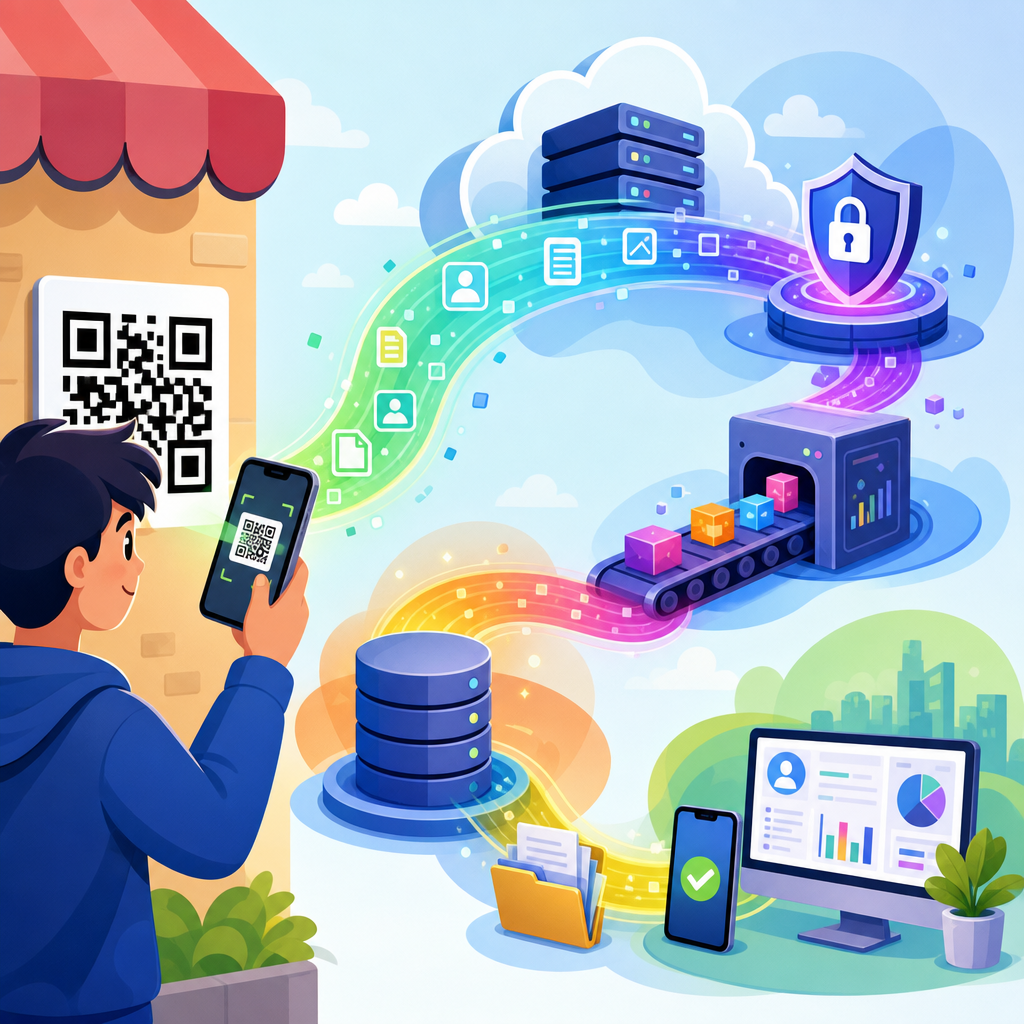
Scanning a QR code feels instantaneous: you point your phone, tap a banner, and land on a website, payment screen, menu, app store page, Wi-Fi prompt, or contact card. What most people do not see is the chain of data events that begins the moment that code is recognized. A QR code, short for Quick Response code, is simply a machine-readable pattern that stores information such as a URL, text string, phone number, email address, geographic coordinate, or payment payload. The privacy issue is not usually the square itself. The real concern is what your device, browser, app, network, and the destination service do with the information exchange that follows the scan.
In practice, I have seen organizations treat QR codes as harmless shortcuts and overlook the fact that they can trigger the same tracking, profiling, and data sharing as any clicked link. A scan can expose your IP address, device type, operating system, approximate location, language settings, referral parameters, and behavior after landing on a page. If the code opens an app, more identifiers may come into play, including advertising IDs or account-linked data. If it starts a payment flow or form, the privacy stakes rise further because personal, financial, or business information may be collected at speed, often on a small screen where notices are easy to miss.
This matters because QR codes now sit everywhere: restaurant tables, parking meters, event badges, product packaging, utility bills, medical forms, retail shelves, and phishing emails. They bridge physical and digital environments, which makes them powerful for convenience and equally powerful for surveillance, fraud, and overcollection. Understanding what happens to your data after scanning a QR code helps you assess risk before you tap, recognize when a scan is safe enough, and ask better questions about consent, retention, and sharing. It also helps businesses design QR experiences that respect privacy instead of treating every scan as an unchecked opportunity to harvest user data.
What Data Is Exposed at the Moment of a QR Scan?
A QR scan itself can happen in two different ways, and the privacy difference is important. If your phone camera detects a code and only previews the embedded text or URL locally, the initial recognition step may remain on your device. In that narrow case, no data necessarily leaves your phone until you tap the link or trigger the action. By contrast, if you use a dedicated scanner app, especially a free one funded by ads or analytics, the app may send scan contents, device identifiers, timestamp data, and usage metrics to its own servers immediately. That means your data trail can begin before you ever visit the destination.
Once you open the linked destination, basic network data becomes visible to the receiving service. This typically includes your IP address, which can reveal approximate location, your user agent string, which signals browser and operating system details, and request headers such as language preference. If the URL includes campaign tags like UTM parameters, a dynamic QR platform can also associate your scan with a specific poster, product, venue, or time window. Many marketers rely on this to measure offline-to-online conversion. From a privacy perspective, it means a seemingly anonymous scan can still become highly attributable when combined with analytics data.
Context matters as much as content. Scanning a QR code at a clinic check-in desk reveals one type of intent; scanning one on a luxury storefront reveals another. Merchants and platforms can infer interest, urgency, travel patterns, and even socioeconomic signals from where and when scans occur. When scan logs are tied to cookies, app identifiers, or logged-in accounts, a business may build a cross-channel behavioral profile that extends well beyond the immediate transaction. This is why privacy professionals focus not only on what a QR code contains but on the metadata generated around its use.
Where Your Data Goes After You Tap
After the scan opens a destination, your data usually passes through several layers. First comes the domain hosting the landing page. That server logs your request and often feeds it into a web analytics platform such as Google Analytics 4, Adobe Analytics, or Matomo. Second, the page may call third-party scripts for tag management, advertising pixels, consent platforms, chat widgets, A/B testing, payment processing, fraud screening, embedded video, social media sharing, or customer data platforms. Each integration can receive pieces of technical or behavioral data, and together they create a much broader footprint than the user expects from a quick scan.
Dynamic QR code systems add another hop. Instead of encoding the final destination directly, they often use a short redirect URL controlled by a QR management provider. That provider records the scan, then forwards you onward. This design is useful because businesses can change the destination later without reprinting the code, but it also centralizes detailed scan analytics. In deployments I have audited, redirect providers commonly log time, device category, approximate geolocation, and campaign identifier by default. Whether that data is retained, shared with sub-processors, or merged with other datasets depends on the provider’s contracts and privacy controls.
If the code opens a mobile app, data handling can become even less transparent. Deep linking frameworks can pass attribution information into the app environment, where mobile measurement partners and software development kits collect events such as installs, sign-ins, purchases, and session duration. Apple’s App Tracking Transparency rules and Android privacy changes have limited some forms of tracking, but they have not eliminated data collection. A QR scan can still act as the first signal in a broader attribution chain that connects a physical touchpoint to in-app behavior and customer lifetime value analysis.
Common Data Privacy Risks Linked to QR Codes
The first major risk is invisible overcollection. Users often think they are scanning for one discrete purpose, such as opening a menu, but the destination may set multiple cookies, fingerprint the device, and trigger third-party trackers unrelated to that purpose. Data minimization, a core privacy principle under laws such as the General Data Protection Regulation, is frequently ignored in these lightweight experiences because teams prioritize marketing measurement over necessity. The result is excessive collection without clear notice, a pattern regulators increasingly scrutinize.
The second risk is deceptive redirection. Attackers can place malicious stickers over legitimate QR codes, sending users to phishing sites that request login credentials, payment details, or one-time passcodes. This threat, often called quishing, exploits the fact that people cannot read a QR destination visually the way they can inspect a printed URL. Even without outright fraud, shortened or redirected links can obscure the final domain and make informed consent difficult. If users do not know who is receiving their data before they land, meaningful choice is weakened.
The third risk is sensitive context leakage. A code used for patient intake, employee attendance, school forms, or legal documents may reveal highly sensitive intent even if the payload itself is simple. Scan logs tied to these contexts can expose health-related interests, workplace patterns, family status, or case activity. This is particularly serious when analytics vendors or cloud providers process the traffic outside the organization’s direct control. Under laws like HIPAA in certain healthcare settings or sector-specific confidentiality obligations, a casual QR workflow can become a compliance problem very quickly.
| QR Code Use Case | Typical Data Collected | Main Privacy Concern |
|---|---|---|
| Restaurant menu | IP address, device type, timestamp, cookies | Behavioral tracking beyond simple menu access |
| Parking payment | Location, vehicle details, payment data, account info | Linking movement patterns to identity |
| Event check-in | Name, ticket ID, arrival time, device metadata | Attendance profiling and data sharing with sponsors |
| Medical intake form | Contact details, symptoms, insurance data | Sensitive information exposure and vendor risk |
| Product packaging | Campaign source, region, browsing behavior | Cross-channel consumer profiling |
How Businesses, Advertisers, and Platforms Use Scan Data
Legitimate uses of scan data do exist, and understanding them helps separate necessary processing from excessive tracking. Businesses use QR analytics to measure whether a poster campaign drove traffic, whether a print brochure outperformed in-store signage, or whether a packaging code led to warranty registration. Retailers may use scans to deliver product documentation, authenticity verification, or recall notices. Transit and venue operators use QR codes to streamline access control. In each case, some logging is operationally reasonable because the service must respond to the request and often prevent abuse.
Problems begin when operational data is repurposed into broad marketing surveillance. An event organizer might share attendee scan behavior with sponsors. A retailer might combine product scan data with loyalty accounts to refine pricing models or remarketing audiences. A property manager might use amenity QR codes to infer occupancy patterns. These practices are often legal only if notices are clear, consent is obtained where required, and retention is limited, but real implementations frequently bury disclosures in long privacy policies that users never see from the scan entry point.
Platforms also use scan data to improve attribution models. For example, a brand may place distinct dynamic QR codes on subway posters, direct mail, and shelf talkers, then compare downstream conversion rates. That sounds harmless until each touchpoint is stitched to customer records through hashed email capture, login events, or payment tokens. At that point, the QR code becomes one element in identity resolution. Customer data platforms, clean rooms, and server-side tagging can make this matching more efficient, not less invasive, unless governance rules are strong.
Legal and Compliance Questions You Should Ask
Whether a QR workflow is compliant depends on jurisdiction, purpose, and the categories of data involved. In the European Union and the United Kingdom, GDPR and the UK GDPR require a lawful basis for processing personal data, transparency at collection, purpose limitation, data minimization, and appropriate processor agreements. If non-essential cookies or advertising technologies fire after a scan, consent may be required before they load. In California, the CCPA and CPRA create disclosure, access, deletion, correction, and opt-out obligations, especially where data is shared for cross-context behavioral advertising.
Sector rules add more complexity. Healthcare organizations may need business associate agreements and stricter controls if a QR code leads to protected health information workflows. Schools, financial institutions, and employers face their own regulatory and contractual duties. Payment-related QR experiences must also align with PCI DSS requirements when card data is processed. A common mistake is assuming the QR code is just a doorway and therefore exempt from the privacy review applied to websites or apps. In reality, the scan entry point is part of the same regulated processing chain.
When I evaluate a QR campaign, I ask simple but revealing questions. Who controls the redirect domain? What exact logs are kept, for how long, and by whom? Which third parties receive data at load? Can the landing page function with analytics disabled? Is there a just-in-time notice before data collection expands beyond what is necessary? Are scans from sensitive locations segregated or protected? If a vendor cannot answer these questions clearly, the privacy posture is weak, no matter how polished the campaign looks.
How to Protect Your Privacy When Scanning QR Codes
Start by previewing the destination before tapping. Most modern phones show the URL, and that preview is your first defense against both scams and unnecessary exposure. Look for the real domain, not just a branded path, and be cautious with shortened links you cannot easily verify. If the context is unusual, such as a code on a public sign asking for immediate payment or login, stop and navigate manually through the organization’s official website or app instead. This simple habit prevents many quishing attacks and limits accidental disclosure.
Next, reduce the amount of data your device shares by default. Use browsers with tracking protection, disable unnecessary permissions, clear cookies periodically, and avoid scanner apps with intrusive advertising or broad data access. On iPhone and Android, the built-in camera is usually safer than third-party scanners because it minimizes extra intermediaries. Consider using a separate browser for high-risk scans, especially those tied to promotions or unknown vendors. Password managers also help because they will not autofill credentials on lookalike phishing domains, giving you another signal that something is wrong.
For organizations, privacy protection means designing QR journeys intentionally. Use direct links where possible, limit redirects, self-host analytics when feasible, and configure consent management before loading non-essential tags. Collect only what the task requires. If a user scans for a menu, do not demand account creation. If a code is placed in a sensitive setting, avoid third-party trackers entirely and shorten retention windows. Clear notices at the scan destination, vendor due diligence, and documented data flow mapping are not optional extras; they are the difference between a convenient tool and a privacy liability.
What happens to your data after scanning a QR code depends less on the code itself than on the ecosystem behind it. A basic scan may reveal almost nothing until you open the link, while a poorly governed campaign can trigger analytics, ad tech, profiling, and data sharing across multiple vendors within seconds. The key point is simple: QR codes are not privacy-neutral shortcuts. They are gateways into web, app, payment, and identity systems that can collect far more information than users realize.
The safest approach is informed caution. Preview links, distrust urgent payment or login prompts, prefer built-in scanning tools, and limit the permissions and trackers that follow you after the tap. If you run QR campaigns, treat them like any other digital collection point: map data flows, justify each field and tag, secure vendors, and provide notice where it matters most. Convenience should not come at the cost of hidden surveillance.
As the hub for QR code security and privacy concerns, this topic leads to deeper questions about scam detection, secure payments, dynamic code governance, and vendor accountability. Review your own scanning habits and your organization’s QR deployments today, then tighten the controls before the next scan turns into an avoidable privacy risk.
Frequently Asked Questions
What data is actually collected when you scan a QR code?
Scanning a QR code does not automatically expose everything on your phone, but it can trigger a sequence of data-sharing events depending on what the code contains and what you do next. The QR code itself usually stores a simple payload such as a website address, payment link, phone number, email draft, Wi-Fi configuration, digital business card, or app download destination. When your camera or QR reader recognizes that information, your device may process it locally first. If the code contains only plain text, the interaction can end there. If it contains a URL or another action-based instruction, the next step often involves opening a browser, app, payment service, or system prompt.
At that point, the data collected typically comes from the destination, not from the black-and-white square itself. A website reached through a QR code may log your IP address, approximate location, device type, browser details, language settings, date and time of access, referral data, and any cookies or tracking identifiers already stored in your browser. If you submit a form, make a payment, sign into an account, download an app, or grant permissions, even more personal information may be collected. In short, scanning the code is usually just the starting signal. The real privacy impact depends on where the code sends you, what technologies are active there, and what actions you take afterward.
Does scanning a QR code by itself give the sender access to my personal information?
In most cases, no. Simply pointing your camera at a QR code and having your phone recognize it does not instantly hand over your name, contacts, photos, passwords, or full identity to whoever created the code. A QR code is generally passive. It stores data, but it does not actively pull files off your device on its own. That said, “by itself” is the important phrase. The moment the scan leads you to a webpage, app, payment flow, Wi-Fi connection, or downloadable file, normal digital tracking and data collection practices can begin.
For example, if the code opens a website, the site can gather standard web analytics information. If it asks you to log in, fill out a form, or allow location access, then you are voluntarily providing more information. If it redirects through a QR campaign platform, the code owner may also receive metrics such as how many times the code was scanned, when scans occurred, what region they came from, and what type of device was used. So while the scan itself is not usually a direct transfer of private data, it can create a path through which data is collected. The safest way to think about it is this: the QR code is a doorway, not a vacuum. Your information is usually gathered after you walk through that doorway.
What happens to my data after the QR code opens a website or app?
Once a QR code opens a website or app, your data begins to move through the same systems that power ordinary online experiences, and that often includes multiple parties. First, your device sends a request to the destination server. That server may record technical details such as your IP address, device model, operating system, browser version, time of visit, and approximate geographic area. If the site uses analytics tools, advertising pixels, social media integrations, or tag managers, those tools may also receive event data about your visit. Cookies or similar technologies can then be placed on your device to remember your session, personalize content, measure engagement, or support targeted advertising.
If the QR code is part of a marketing campaign, there may also be a tracking layer before you even reach the final page. Dynamic QR code services often route scans through their own systems so businesses can measure performance. That means scan counts, location estimates, device categories, and timestamps may be logged before the redirect happens. If you then make a purchase, sign up for a newsletter, register for an event, or install an app, your data may be stored in customer relationship systems, payment processors, email marketing platforms, and app analytics dashboards. In practical terms, your data after a scan can flow to website operators, cloud hosts, analytics providers, advertisers, payment vendors, and app developers. What happens next depends on each party’s privacy policy, retention practices, security controls, and legal obligations.
Are QR codes used for tracking, analytics, or marketing attribution?
Yes, very often. QR codes are widely used as measurement tools because they create a direct bridge between offline materials and online behavior. A business can place one QR code on a restaurant table, another on a product package, another on a flyer, and another in a store window, then compare scan performance across each location. Dynamic QR codes are especially useful for this because the destination can be changed without printing a new code, and the scans can be logged in a central dashboard. That allows organizations to evaluate campaign success, identify high-performing channels, and understand customer engagement patterns.
The tracking is usually less about the image itself and more about the infrastructure behind it. A scan may reveal when it happened, roughly where it happened, which device type was used, and whether the user continued to the landing page or completed a desired action. If the landing page contains UTM parameters, pixels, cookies, or conversion tags, the scan can also become part of a larger attribution system tying offline promotion to online sales, signups, downloads, or visits. This is why QR codes appear so often in advertising, packaging, direct mail, posters, and event materials. For privacy-minded users, the key takeaway is that a QR code can be a tracking entry point even if it looks simple and harmless. It is often the first step in a broader analytics and marketing funnel.
How can I protect my privacy and security after scanning a QR code?
The best protection is to treat a QR code with the same caution you would give an unfamiliar link. Before tapping the prompt, preview the destination if your phone allows it and check whether the URL looks legitimate. Be especially careful with shortened links, misspelled domain names, and codes posted in public places where stickers can be placed over original materials. If the QR code opens a webpage, look for HTTPS, review the site carefully, and avoid entering sensitive information unless you trust the source. If it triggers a Wi-Fi connection, payment request, app installation, or file download, pause and confirm that the action makes sense in context.
It also helps to reduce the amount of data available to destinations after the scan. Use privacy-focused browser settings, limit ad tracking where possible, and decline unnecessary permissions such as location, contacts, microphone, or camera access when they are not required. Keep your phone’s operating system and apps updated so known security flaws are patched. If a page asks for login credentials, payment details, or personal identifiers, verify that you reached the correct service rather than a phishing copy. Finally, read privacy notices when the interaction is tied to a promotion, payment flow, event registration, or app install. Protecting yourself after scanning a QR code is less about fearing the code itself and more about staying alert to the chain of digital actions that follows.





