
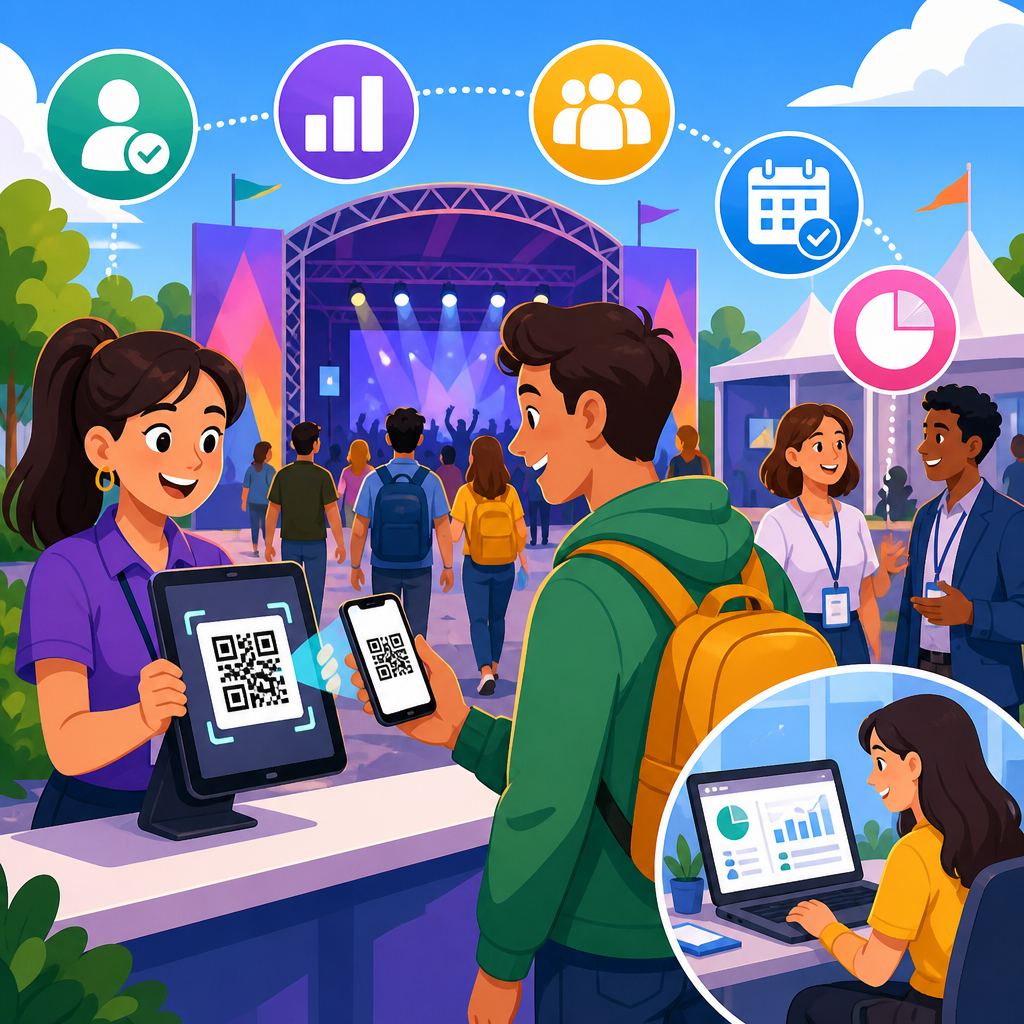
QR codes have become one of the most practical tools in modern event operations because they connect physical spaces, attendee identities, tickets, schedules, payments, and follow-up data with a simple scan. In event management, a QR code is a machine-readable matrix barcode that stores a URL, pass, identifier, or action trigger, allowing organizers to move people and information quickly without printing long instructions or relying on manual data entry. I have used QR-based workflows at conferences, trade shows, fundraising galas, and training seminars, and the same pattern appears every time: when the code strategy is planned well, lines shorten, staff errors drop, and attendees spend more time participating instead of waiting.
This matters because events compress risk into a short window. Registration, access control, wayfinding, networking, sponsor activation, cashless purchasing, lead capture, and post-event reporting all happen on a fixed schedule, often with temporary staff and changing conditions. A small delay at the entrance can ripple across the entire day. A mismatch between a guest list and a badge can affect security, catering counts, and sponsor commitments. QR codes improve event management by creating a common link between the attendee record in the event platform and the real-world moments where decisions happen. They are inexpensive to deploy, familiar to users, and compatible with standard smartphone cameras, dedicated scanners, self-service kiosks, and mobile apps.
For events and ticketing teams, the value goes beyond convenience. QR codes support faster check-in, touchless interactions, better fraud control, cleaner analytics, and easier updates than static printed materials. They also help organizers build a connected attendee journey, from invitation and registration to breakout sessions and post-event surveys. As a hub article for events and ticketing, this guide explains where QR codes fit, how they improve operational performance, what tools and standards matter, and how to avoid common mistakes when scaling from a small local event to a multi-day conference or stadium-size experience.
Faster registration, check-in, and access control
The most visible use of QR codes in event management is ticket validation at entry. Each registrant receives a unique QR code tied to a ticket ID, order number, or attendee profile in a platform such as Eventbrite, Cvent, Bizzabo, Hopin, Whova, Splash, or Ticketmaster. At the door, staff scan the code with a mobile app or handheld reader, and the system instantly checks status fields such as paid, complimentary, canceled, transferred, or already redeemed. This replaces alphabetized paper lists and reduces lookup time from minutes to seconds. At a 1,500-person conference I helped staff, moving from printed rosters to QR scanning cut average check-in time per attendee dramatically and let us reassign two registration workers to speaker support within the first hour.
QR validation also improves security and ticket integrity. Because each code is unique, the platform can flag duplicates, screenshots of used tickets, and unauthorized transfers. Dynamic QR codes add another layer by refreshing the displayed credential or routing through a live verification endpoint, which reduces the risk of copied static images being reused. For higher-security venues, the code scan can be paired with government ID checks, badge printing rules, or access permissions for VIP lounges, backstage areas, or paid workshops. In practical terms, QR codes help event teams answer critical entrance questions quickly: Is this guest valid, where can they go, and have they already entered?
Access control extends beyond the front door. Multi-track events often use QR scans to admit attendees into breakout sessions with limited capacity, continuing education workshops that require attendance tracking, or exhibitor-only setup periods. This creates reliable occupancy data and supports compliance needs. For example, associations offering continuing education credits can verify whether a participant entered the relevant session, while corporate events can measure attendance by department or invitation tier. The result is smoother flow management and better accountability with less manual reconciliation after the event.
Better attendee experience across the event journey
QR codes improve the attendee experience because they reduce friction at multiple touchpoints, not just admission. A confirmation email can include a QR code for mobile ticket retrieval, parking instructions, or a digital wallet pass. Signage at the venue can link attendees to the agenda, speaker bios, venue map, FAQ page, accessibility details, emergency contacts, or real-time room changes. Instead of reprinting schedules when a keynote shifts rooms, organizers can update the destination behind a dynamic QR code and preserve the same signage. That flexibility is especially useful at festivals, trade shows, and university events where schedules often change close to start time.
Networking is another high-value use case. Exhibitors and attendees can display QR codes on badges, lanyards, booths, or in event apps so contacts can exchange details without typing names into phones in a noisy hallway. Many event platforms convert a scan into a saved lead record, tagged by time, booth, staff member, and source campaign. Sales teams prefer this because the lead enters the CRM faster and with fewer transcription errors. Attendees benefit too: instead of carrying stacks of brochures, they can scan codes to collect session slides, product sheets, trial offers, or speaker contact forms for later review.
QR codes can also make events more inclusive and easier to navigate. Organizers can place codes near entrances, stages, and service desks that open large-text schedules, multilingual guides, captioning access, dietary information, or directions to accessible seating and restrooms. For museum events or cultural festivals, a code can trigger audio guides or translations. The technology is not a replacement for good signage and trained staff, but it adds a low-cost support layer that helps attendees self-serve when they need information quickly.
Operational efficiency for staff, vendors, and sponsors
Behind the scenes, QR codes simplify workflows that usually consume event staff time. Registration packets, exhibitor manuals, setup instructions, load-in maps, catering updates, and volunteer schedules can all be distributed through targeted codes rather than repeated printouts or last-minute email searches. Vendors can scan to confirm deliveries, technicians can open production run sheets, and temporary staff can access training videos on their phones before a shift starts. In my experience, this matters most during compressed setup windows, when every saved minute reduces stress and coordination errors.
Sponsors and exhibitors benefit because QR codes create measurable engagement. A booth code can launch a contest entry form, product demo booking page, gated white paper, or instant coupon. Unlike a general homepage URL, a campaign-specific QR code provides attribution data that sponsors can actually evaluate. Organizers can package this as part of sponsorship inventory: stage-side signage with trackable scans, branded networking zones linked to sign-up pages, or sponsored session materials distributed through unique QR destinations. That makes sponsorship reporting stronger and helps justify renewals.
Food, beverage, merchandise, and donation workflows also become more efficient with QR codes. Attendees can scan table tents or concession signs to order, pay, tip, and receive pickup notifications. Nonprofits use QR codes at galas and charity runs to direct guests to mobile giving pages, auction catalogs, or pledge forms, often increasing impulse donations because the giving path is immediate. For paid events, this same mechanism supports upsells such as VIP upgrades, after-party access, parking add-ons, and premium content bundles. The operational advantage is simple: fewer bottlenecks at staffed counters and more actions completed on the attendee’s own device.
Data, measurement, and event ROI
One of the strongest reasons QR codes improve event management is the quality of the data they generate. Every meaningful scan can be logged with a timestamp, location, campaign source, staff member, device, or attendee identifier, depending on the setup and privacy rules. That creates a much richer operational picture than headcounts alone. Organizers can see when check-in peaks occurred, which sessions drew actual attendance instead of just registrations, which sponsor activations converted, and where attendees sought information most often. This helps teams plan staffing, signage, room assignments, and inventory more accurately for future events.
Good measurement depends on structure. Static QR codes are useful for fixed destinations, but dynamic QR codes are generally better for event campaigns because they can be edited after printing and tracked centrally. UTM parameters, shortened campaign links, CRM integrations, and event app analytics allow organizers to connect scans to outcomes such as registration completion, meeting bookings, app downloads, purchases, or survey submissions. Google Analytics 4, HubSpot, Salesforce, and event platforms with built-in reporting can all support this process. When configured properly, QR analytics move event reporting beyond attendance totals into behavior and conversion analysis.
| Event goal | QR code use | Metric to track | Operational benefit |
|---|---|---|---|
| Speed entry | Ticket check-in | Average scan time | Shorter lines and lower staffing pressure |
| Fill sessions | Room access scans | Attendance by session | Better capacity planning |
| Generate sponsor value | Booth lead capture | Qualified leads per exhibitor | Stronger renewal reporting |
| Increase revenue | Upsell and payment links | Conversion rate and order value | More sales with fewer service desks |
| Collect feedback | Survey links | Response rate by audience | Faster post-event insights |
There are limits, and accurate analysis requires discipline. A scan does not always equal intent, and not every attendee will use a code, especially in low-connectivity venues or among audiences that prefer staffed assistance. Privacy compliance also matters. If scans are linked to identifiable attendee records, organizers should disclose data collection clearly and follow relevant requirements under laws such as GDPR or CCPA where applicable. The right practice is to collect only what is necessary, secure the data, and define retention rules before the event begins.
Implementation best practices and common mistakes
Successful QR deployment starts with system design, not artwork. First, decide what each code should do: validate entry, open information, capture a lead, trigger payment, confirm attendance, or route to support. Then map each use case to a platform owner, fallback process, and success metric. For ticketing and access, use unique identifiers and real-time redemption status whenever possible. For signage, prefer dynamic destinations so room changes and agenda updates do not require reprints. For analytics, establish naming conventions for campaigns, locations, and audience segments before codes are generated; otherwise reporting becomes fragmented and difficult to trust.
Design and placement matter more than many teams expect. Codes need adequate size, strong contrast, quiet zones around the edges, and testing under real venue conditions including glare, low light, distance, and crowd movement. A beautifully branded code that scans poorly creates instant frustration. Include a short call to action near every code, such as “Scan for agenda updates” or “Scan to claim your badge,” so attendees know the benefit. If the destination requires an app download, state that upfront. If mobile signal is weak inside the venue, provide guest Wi-Fi details nearby or preload key ticket data in the event app.
The most common mistakes are preventable. Teams sometimes print static QR codes too early, then discover that landing pages, forms, or seating assignments changed. Others place a single code for a high-demand action where multiple stations are needed, creating a line just to scan. I have also seen organizers rely entirely on attendee phones without preparing battery chargers, offline check-in modes, or manual exception handling for cracked screens and inaccessible email accounts. A strong event plan treats QR codes as part of a resilient workflow, with backup scanners, power, printed contingencies, and trained staff who understand what to do when the ideal path fails.
Where QR codes fit in the wider events and ticketing strategy
As a hub topic within industry QR code use cases, events and ticketing cover more than admission. The strongest programs use QR codes across the full lifecycle: promotion, registration, confirmation, arrival, navigation, engagement, transactions, lead capture, feedback, and retention. A music festival may use codes for digital tickets, cashless top-ups, merchandise ordering, artist schedules, and emergency alerts. A B2B trade show may focus on badge pickup, exhibitor lead retrieval, session attendance, sponsored downloads, and meeting scheduling. A nonprofit fundraiser may prioritize mobile giving, silent auction bidding, table assignments, and donor follow-up. The underlying principle is the same: each scan should remove friction or create measurable value.
QR codes work best when integrated with the rest of the event stack rather than treated as isolated graphics. Ticketing, CRM, email automation, payment processing, badge printing, access control, and analytics should exchange data cleanly. Standards such as encrypted pass formats, secure payment gateways, role-based access permissions, and audit logs matter more as event size and sensitivity increase. That is why enterprise teams often involve operations, IT, marketing, legal, and venue security in planning. A quick code generator can create an image in seconds, but a reliable event QR system is an operational asset built on governance and testing.
For organizers building an events and ticketing program, the takeaway is clear: QR codes improve event management when they are tied to defined attendee actions, connected systems, and measurable outcomes. They shorten lines, support safer access, simplify communication, strengthen sponsor reporting, and produce better event data. Start with one or two high-impact applications such as check-in and agenda access, test them in real conditions, and expand into payments, lead capture, and post-event surveys once the foundation works. Done well, QR codes turn a fragmented event experience into a coordinated, trackable journey. Review your next event plan, identify the biggest friction points, and deploy QR codes where a scan can remove them fastest.
Frequently Asked Questions
How do QR codes improve event check-in and reduce delays at the entrance?
QR codes streamline check-in by turning every ticket, registration confirmation, or attendee credential into a fast, scannable access point. Instead of asking staff to manually search names, verify printed documents, or correct spelling errors in real time, organizers can scan a unique QR code and immediately confirm registration status, ticket type, access permissions, and arrival time. This significantly reduces lines at entrances, which is especially important for conferences, trade shows, festivals, and corporate events where large groups often arrive at the same time.
In practice, this creates a smoother attendee experience and a more controlled operational flow. Staff can process guests faster, move people into the venue with fewer bottlenecks, and quickly identify exceptions such as duplicate tickets, invalid registrations, or guests attempting to enter restricted areas. QR-based check-in also improves record accuracy because the system captures each scan automatically, eliminating much of the human error associated with paper guest lists or manual entry. For event teams, that means better visibility into attendance patterns, better staffing decisions at entry points, and fewer disruptions during high-traffic periods.
Can QR codes be used beyond ticketing during an event?
Yes, and that is where they become especially valuable. While many people associate QR codes with tickets and check-in, their usefulness extends across the entire event journey. Organizers can place QR codes on signage, badges, booths, tables, screens, printed programs, and venue maps to connect attendees instantly to digital schedules, speaker bios, session handouts, exhibitor pages, feedback forms, Wi-Fi instructions, networking profiles, and event apps. This reduces the need for excessive printed materials while making information easier to update and distribute.
QR codes can also support interactive and operational functions during the event itself. A code can be used to check into breakout sessions, redeem meal vouchers, access VIP lounges, submit live questions, enter giveaways, complete surveys, or download presentation materials. At exhibitor booths, attendees can scan to request follow-up, collect product information, or save contact details without exchanging paper brochures. This creates a more connected event environment where physical touchpoints trigger useful digital actions, helping attendees move through the experience with less friction and helping organizers gather more meaningful engagement data at the same time.
Are QR codes secure enough for event access, payments, and attendee management?
QR codes can be very secure when implemented properly, but security depends on how the event system is designed rather than on the code image alone. A QR code used for event management typically points to a secure database record, encrypted token, or authenticated workflow instead of simply displaying sensitive information. When each attendee receives a unique, non-transferable code tied to their registration profile, organizers can validate identity, limit reuse, enforce permissions, and track scan activity in real time. This makes QR systems far more reliable than unmanaged paper tickets or informal guest lists.
For stronger protection, event teams should use secure registration platforms, expiring or dynamic QR codes when appropriate, role-based access controls, encrypted payment gateways, and staff scanning apps that verify codes against a live backend. These measures help prevent fraud, screenshot reuse, and unauthorized access. For payments, QR codes usually act as a bridge to a secure checkout process rather than storing card details directly. In attendee management, they can also support audit trails by logging exactly when and where a code was scanned. So while no system is automatically risk-free, QR codes are absolutely suitable for event access and operations when paired with modern security practices and a trusted event technology stack.
What kind of event data can organizers collect from QR code scans?
QR code scans can generate a remarkably useful set of operational and marketing data. At the most basic level, organizers can track who checked in, when they arrived, which entrance they used, and whether they attended specific sessions or zones. If QR codes are used throughout the venue, event teams can also measure engagement across booths, sponsor activations, content downloads, food redemption points, networking stations, and post-session feedback forms. This turns what used to be guesswork into measurable attendee behavior.
The value of this data goes well beyond attendance counts. Organizers can identify peak traffic times, high-performing sessions, popular exhibitors, underused event areas, and conversion points where attendees move from interest to action. Sponsors can receive better reporting on booth engagement, lead capture, and content interactions. Event marketers can use scan data to segment follow-up communications based on actual attendee behavior, such as which sessions someone attended or which products they explored. Over time, these insights help teams improve venue layout, scheduling, staffing, sponsorship packages, and content planning. In short, QR codes do not just help run the event efficiently; they also create a stronger foundation for reporting, optimization, and future event strategy.
Do QR codes work for both small events and large multi-day conferences?
Absolutely. One of the biggest advantages of QR codes is their flexibility across event sizes and formats. For a small workshop, networking dinner, school function, or local fundraiser, QR codes can simplify basic tasks such as guest check-in, agenda sharing, donation collection, and feedback gathering without requiring a large staff or complex infrastructure. They are cost-effective, easy to deploy, and familiar to most attendees, which makes them especially appealing for smaller teams trying to improve professionalism and efficiency without investing in bulky hardware or excessive printing.
For large multi-day conferences, expos, and festivals, QR codes scale extremely well because they support high-volume scanning, segmented access control, live schedule updates, session tracking, sponsor engagement, and integrated analytics. A single attendee badge can be used to manage entry, workshop attendance, lead capture, meal access, and networking touchpoints across multiple days and locations. Organizers can also adjust digital destinations behind the codes as schedules shift or rooms change, avoiding the operational headaches of reprinting materials. Whether the event is intimate or massive, QR codes help centralize information, automate repetitive processes, and create a more seamless experience for both attendees and staff.





