
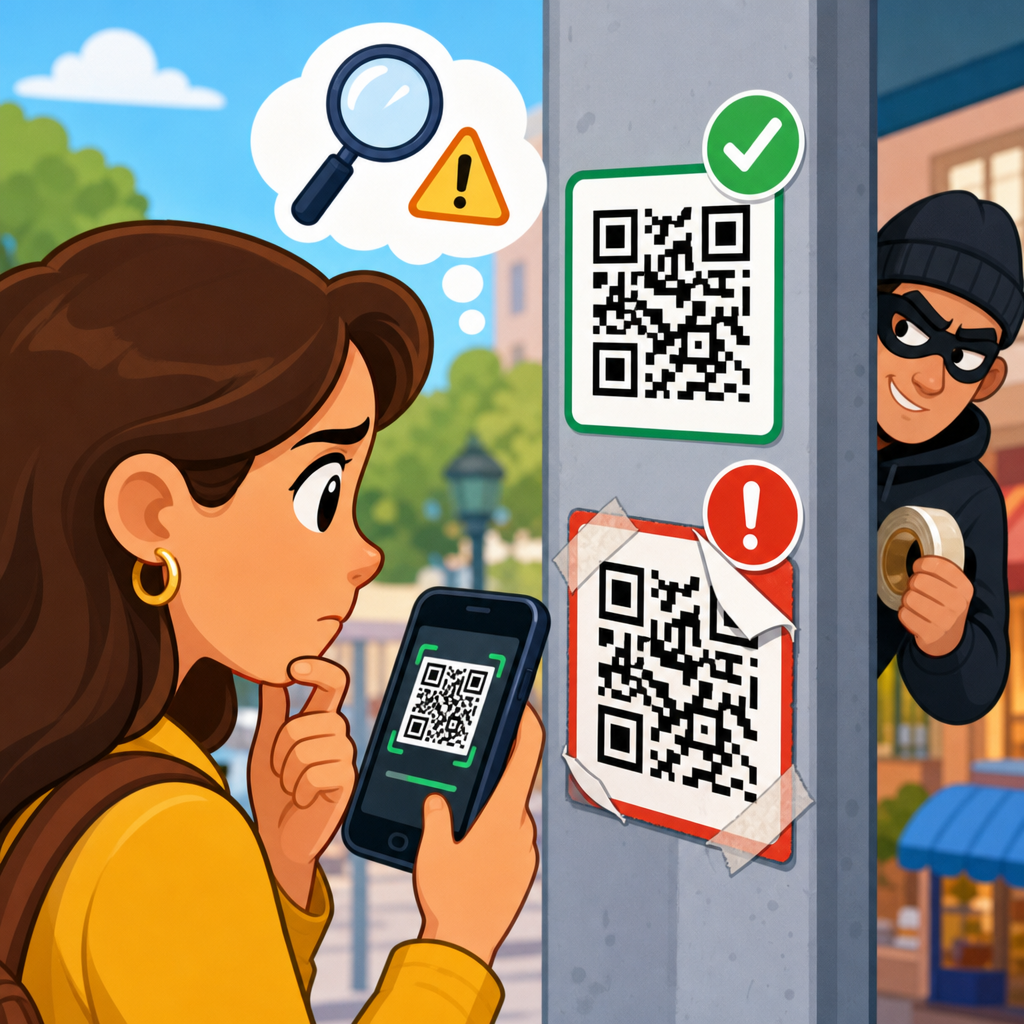
QR codes are now routine on parking meters, restaurant tables, utility bills, package slips, and public posters, which makes them convenient for users and equally attractive to criminals. A fake QR code is a malicious or deceptive code placed where people expect a legitimate one, with the goal of stealing payments, login credentials, personal data, or device access. In practical terms, spotting a fake QR code means checking both the physical code and the digital destination before you tap, pay, sign in, or download anything. That skill matters because QR code scams work by compressing trust into a single scan: the victim does not type a web address, does not inspect a sender email, and often acts in seconds.
I have worked on fraud reviews for payment flows and customer support escalations, and the pattern is consistent. People rarely fall for sophisticated graphics; they fall for context that feels normal. A sticker placed over a parking kiosk code, a code printed on a fake invoice, or a sign promising account verification can redirect a victim to a phishing page that looks almost identical to the real service. Security teams sometimes call this quishing, short for QR phishing. The tactic surged as mobile payments and app-based sign-ins grew, and agencies including the FTC and FBI have warned consumers about QR-related fraud in public payment settings and unsolicited messages.
For a hub page on QR code scams and fraud, the central idea is simple: a QR code is only a transport mechanism. The code itself is not inherently safe or unsafe; the risk comes from what it opens and what the user is prompted to do next. That is why effective protection combines visual inspection, destination verification, payment caution, and basic device hygiene. If you understand the common scam patterns, the warning signs of tampering, and the verification steps that take less than thirty seconds, you can avoid most fake QR code attacks without giving up the convenience that made QR codes popular in the first place.
What fake QR codes are and how the scam works
A QR code is a machine-readable matrix barcode that usually stores a URL, payment request, contact card, app deep link, Wi-Fi credential, or other structured data. Attackers exploit that flexibility. They generate a new code that points to their own website or payment endpoint, then place it where a legitimate code would normally appear. In the physical world, that often means adhesive labels over existing codes on parking meters, gas pumps, tabletop ordering cards, transit kiosks, and event posters. In digital channels, the code may appear in emails, text messages, social posts, PDFs, or mailed documents that impersonate banks, delivery companies, tax agencies, or employers.
The scam usually follows one of four paths. First, credential theft: the code opens a login page that mimics Microsoft 365, Google, a bank, or an internal company portal. Second, payment diversion: the victim believes they are paying for parking or a bill, but the money goes to the attacker. Third, malware or malicious app installation: the page urges the user to install a “required” app, profile, or update. Fourth, data harvesting: the form asks for card details, identity information, or multifactor authentication codes under a pretext such as account confirmation or package release. Every version relies on urgency, convenience, and the small screen of a phone.
One reason fake QR code scams are effective is that many users assume a code is vetted merely because it is printed. That assumption is dangerous. A printed code on a flyer can be swapped in seconds. A code inside a PDF invoice can be altered before the file reaches a customer. Even well-designed campaigns can be imitated because the attacker does not need to break the real system; they only need to mimic the path to it. If the destination page copies the logo, colors, and wording of the real brand, the victim may not notice until a card charge appears or an account is taken over.
Common places where fake QR codes appear
The highest-risk locations are places where people are distracted and already expect to scan. Parking payment stations are a classic example because users are often in a hurry, standing outdoors, and focused on avoiding a ticket. Fraud investigators have repeatedly found sticker overlays on municipal kiosks that redirect to lookalike parking sites with slightly altered domain names. Restaurants are another target, especially venues that use tabletop QR menus and mobile payment. If a fake code is placed over a real one, customers may enter card details into a cloned checkout page before staff notice the tampering.
Public notices and utility-style communications also create risk. A fake QR code on a package delivery note may claim a failed shipment fee is due. A poster near an event entrance may promise faster check-in if guests verify tickets through a scan. In offices, fake codes can appear on “new policy” notices or in emails that claim to help employees reset passwords, enroll in benefits, or review payroll statements. Because many authentication systems now support QR sign-in, workers are conditioned to trust code-based login prompts, which gives attackers a credible story.
Not every scenario is physical. Some of the most damaging campaigns use QR codes in email because secure email gateways often inspect links more effectively than images. The QR code hides the URL inside the image, encouraging a mobile scan that moves the victim off the protected desktop environment and onto a personal phone. I have seen this in account-verification lures and fake voicemail notices. The message itself may contain little text, making traditional detection harder. The user sees a familiar logo, scans, lands on a polished phishing page, and enters credentials outside the normal corporate browser controls.
How to inspect a QR code before you scan
The first check is physical. Look for signs of tampering such as a sticker layered on top of another sticker, edges that do not align with the surface, mismatched branding, fading, bubbling, or a code that appears newer than the surrounding sign. On metal kiosks and laminated menus, a fraudulent overlay often has different reflectivity or print sharpness. If the code is part of a permanent fixture, ask whether it makes sense that it would be attached with a small adhesive label instead of being printed directly into the design. Criminals count on people not pausing for that basic plausibility test.
The second check is contextual. Ask what the code is supposed to do and whether that action fits the setting. A parking meter code should lead to a parking domain or a known app, not to a generic payment page asking for full identity details. A restaurant menu should not demand a software install. A utility bill QR code should not ask you to sign into an unrelated cloud account. If the surrounding message uses pressure tactics such as “pay in five minutes,” “verify immediately,” or “account will be suspended,” treat the code as suspect. Urgency is one of the strongest indicators of fraud.
The third check is source confirmation. If the code appears in an email, text, or flyer, compare it with the official website, app, or customer support channel before scanning. Legitimate organizations usually provide alternate paths. If your city’s parking service has an app listed on the municipal website, use that instead of a kiosk sticker. If a bank sends a QR code, open the banking app directly and look for the same task there. A trustworthy organization never requires a QR scan as the only way to complete a routine action, especially a payment or password reset.
What to check after you scan but before you act
Most smartphones now show a preview of the destination before opening it. Use that moment. Read the full domain carefully, not just the page title. Attackers rely on lookalike domains such as cityparking-pay.com instead of cityparking.gov, or micros0ft-login.example instead of microsoft.com. Watch for extra words, hyphens, odd country-code domains, and misspellings that are easy to overlook on a phone screen. If the preview is hidden, abbreviated, or routed through an unknown link shortener, stop and verify through another channel. A real service benefits from transparency; a scam benefits from speed.
After opening the page, evaluate the site with the same discipline you would use on a desktop. Check whether the connection is encrypted, whether the domain still matches the claimed brand, and whether the content feels proportionate to the action. A parking payment page should ask for the minimum required details, not date of birth, account password, or one-time passcodes. A menu page should display menu items, not an identity form. Be especially cautious if the page requests card details before showing prices, terms, or merchant identity. Fraudulent pages often focus on harvesting data first and explaining later.
Authentication prompts deserve special scrutiny. If a QR code leads to a login page for Microsoft 365, Google Workspace, Okta, or another known service, ask why you are being asked to sign in from that exact context. In enterprise attacks, fake QR codes commonly imitate single sign-on pages because users recognize the interface and assume legitimacy. If the prompt appears outside your usual workflow, close it and navigate manually through a saved bookmark or the official app. In every investigation I have handled, manual navigation would have prevented the compromise because the victim would have seen the real site instead of the cloned one.
Red flags that strongly suggest a fake QR code scam
Several warning signs appear again and again in QR code fraud cases. The clearest is a mismatch between the code’s context and the landing page. Another is a request for unusual information, especially passwords, one-time codes, card verification values, or full identity details for a low-risk task. Poor spelling by itself is not decisive because some phishing pages are polished, but inconsistent branding, low-resolution logos, broken links, and pages that disable browser navigation are strong signals. So is any demand to install a mobile configuration profile, enable unknown app permissions, or bypass normal app store channels.
Payment friction can also reveal a scam. Legitimate merchants disclose who is charging you, what you are buying, and how disputes are handled. Scam pages often hide merchant identity, rush you toward Apple Pay or card entry, or fail to provide receipts and support details. If you are paying for parking, you should see zone information, time purchased, and a city or vendor name you can verify. If the page shows a generic checkout with no traceable operator, walk away. Criminals prefer ambiguous payment experiences because ambiguity makes chargeback disputes and law-enforcement follow-up harder.
| Situation | Likely legitimate behavior | Common fake QR code behavior |
|---|---|---|
| Parking meter | Known app or verified city payment domain | Sticker overlay to a lookalike payment site |
| Restaurant menu | Menu loads without login or app install | Page asks for card details or downloads |
| Email from employer | Instruction also available in company portal | Image-only message urging immediate scan |
| Package notice | Tracking available through official carrier app | Small fee request on a cloned delivery page |
A final red flag is exclusivity. Attackers often claim the QR code is the only accepted method: only way to pay, only way to verify, only way to avoid suspension. Real organizations almost always offer alternatives such as a website, app, phone support line, or in-person option. When there is no fallback path, question why. Exclusivity is not a convenience feature; in scam design, it is a control mechanism that keeps the victim inside the fraudulent flow and away from channels where the deception would be obvious.
How to protect yourself, your family, and your organization
The most effective defense is to reduce blind scanning. Use official apps, saved bookmarks, and manually entered web addresses for routine tasks like parking, bill payment, and account login. Keep your phone operating system and browser updated because mobile security protections improve continuously, including safer link handling and phishing detection. Enable multifactor authentication on important accounts, but never enter authentication codes into a page opened from an unverified QR scan. A password manager also helps because it will usually refuse to autofill on a lookalike domain, creating a useful warning at exactly the right moment.
Families should agree on simple scanning rules. Children and older adults are frequent targets because they may trust signs in public spaces or digital notices that look official. Teach them to inspect for sticker overlays, read the domain preview, and ask before paying through a QR code. In households where shared cards are used on phones, turn on transaction alerts so unauthorized charges are noticed quickly. For older relatives, I often recommend a default rule: never use a QR code for banking, taxes, or government services unless a trusted family member confirms the destination first. Clear rules beat vague caution.
Organizations need layered controls. Security awareness training should include QR phishing examples, especially image-based email lures that request mobile scans. Mobile device management can restrict risky app installs and profile enrollment. Email security tools should use optical character recognition and image analysis to inspect QR codes embedded in messages, while secure web gateways should block newly registered or suspicious domains commonly used in phishing campaigns. Facilities teams should also inspect public-facing signs and kiosks for tampering. Fraud prevention is not only a digital responsibility; in QR code security, physical controls and front-line staff awareness matter just as much.
What to do if you scanned a fake QR code
If you scanned a suspicious code but did not enter any information, close the page, clear the browser tab, and avoid returning. If you entered login credentials, change the password immediately from the official site or app, revoke active sessions if the service allows it, and update multifactor settings. If you submitted payment details, contact the card issuer or bank at once, freeze or replace the card if advised, and review recent transactions for unauthorized activity. Speed matters because attackers often test stolen credentials and cards within minutes or hours, not days.
If you installed an app, profile, or file after scanning, treat the device as potentially compromised. Remove the app if possible, review granted permissions, run a mobile security scan if available, and contact your employer’s IT team if the device accesses corporate accounts. For iPhone and Android users alike, configuration profiles, accessibility permissions, and device administrator privileges deserve close review because they can expand attacker control. Preserve evidence by taking screenshots of the QR code, the landing page, payment confirmation screens, and any related messages. That documentation helps banks, employers, platforms, and investigators respond more effectively.
Report the incident through the relevant channel. For public kiosk tampering, notify the city, venue, or merchant immediately so others are protected. For impersonation of a bank, carrier, or employer, use the official fraud reporting address or support line listed on the company’s website. You can also report consumer fraud to national authorities where applicable. Beyond the individual case, reporting improves pattern detection. A single fake parking code may seem minor, but several reports from the same area can reveal an organized campaign and lead to faster takedown of domains, payment accounts, and physical overlays.
Spotting a fake QR code comes down to a repeatable habit: inspect the code, verify the destination, question the request, and use an official path when anything feels off. The biggest mistakes happen when people treat the scan itself as trust. It is not trust; it is only a shortcut. Real protection starts before the scan with physical awareness and continues after the scan with domain checking, payment caution, and skepticism toward urgency. Because QR code scams and fraud now span public payments, phishing, package delivery, workplace logins, and fake support flows, a broad mental checklist is more valuable than any single trick.
The practical benefit of learning these checks is immediate. You reduce the chance of losing money, exposing credentials, or handing control of a device to an attacker, and you also become better at protecting family members and colleagues who may be less familiar with mobile fraud patterns. In my experience, people do not need advanced technical skills to avoid most fake QR codes. They need a clear process and the discipline to pause for a few seconds before acting. That pause is often enough to notice a sticker overlay, a strange domain, or an unnecessary request for sensitive information.
Use this article as your hub for QR code scams and fraud: review the common scenarios, apply the red-flag checklist, and build safer habits around payments and logins. The next time you encounter a code on a parking meter, menu, invoice, or email, do not scan on autopilot. Verify first, act second, and choose the official app or website whenever possible.
Frequently Asked Questions
What is a fake QR code, and why are scammers using them so often now?
A fake QR code is a malicious or deceptive code designed to send you somewhere different from where you think you are going. It may look harmless on a parking meter, restaurant table, package notice, utility bill, flyer, or public poster, but when scanned, it can redirect you to a phishing site, trigger a payment request, prompt you to enter login credentials, or even try to get you to download malware. Criminals like QR codes because people have been trained to trust them as a fast, convenient shortcut. Instead of typing a website address carefully, users often scan and tap without pausing to verify the destination.
That combination of convenience and automatic trust makes QR code scams effective. A scammer can print a sticker and place it over a real code, swap a code in an email or document, or create a convincing fake version of a legitimate payment page. In many cases, the code itself does not look suspicious at all. The risk comes from what happens after the scan. That is why learning how to spot a fake QR code is less about decoding the pattern by eye and more about checking the context, the placement, and the web address or payment destination before you proceed.
How can I tell if a QR code has been physically tampered with or replaced?
Start by examining the code and the surface around it. One of the most common scams is a fraudulent sticker placed directly over a legitimate QR code. If you notice peeling edges, air bubbles, uneven placement, mismatched branding, low-quality printing, or a sticker layered on top of another sticker or sign, treat it as suspicious. A code that looks newer than the surrounding sign, uses different colors or fonts from the rest of the display, or appears hastily attached can also be a warning sign.
Context matters just as much as appearance. Ask yourself whether the QR code makes sense for that location and task. On a parking meter, for example, a payment code should usually match the city, transit authority, or parking provider named on the machine. In a restaurant, the menu or payment code should match the business name and likely appear in a consistent, professional format. If a utility bill or package slip includes a code, compare it with the company’s normal branding, support numbers, and website domain. When something feels off, do not scan immediately. Instead, use a known official app, type the company’s web address manually, or ask staff or customer support to confirm the correct code. A few extra seconds of verification can prevent a stolen payment or compromised account.
What should I check after scanning a QR code before I tap, pay, or enter any information?
The most important step is to inspect the destination before taking action. Many phones show a preview of the link before opening it, and that preview is your best chance to catch a scam. Look closely at the domain name. A legitimate company might use a clear, recognizable address, while a fake site may rely on misspellings, extra words, random strings of letters, unusual subdomains, or a domain that has nothing to do with the business you expected. For example, a restaurant menu should not open a login screen on an unrelated domain, and a parking payment page should not route through a suspicious URL that does not match the city or service provider.
Once the page opens, keep checking. A secure-looking page is not enough on its own. Scammers can copy logos, colors, and layouts very convincingly. Watch for rushed instructions, aggressive warnings, countdown timers, requests for unusual permissions, or prompts to enter details the business should not need, such as your email password, banking login, or unnecessary personal information. Be extra careful if the page asks you to download an app, disable security settings, or approve a large payment without clearly showing the merchant name. If anything does not line up with your expectation, stop immediately and verify through the official website, app, or customer service channel before continuing.
Where are fake QR codes most commonly found, and which situations are riskiest?
Fake QR codes tend to appear in places where people are moving quickly and expect to scan without much thought. Parking meters are a major target because users are often in a hurry and ready to pay on the spot. Restaurant tables, outdoor posters, transit stops, package delivery notices, event signage, and shared public bulletin boards are also common because scammers can place a fake sticker and blend in with existing materials. Utility bills, invoices, and email attachments can carry deceptive QR codes too, especially when the message creates urgency around late payments, account verification, or delivery issues.
The highest-risk situations are the ones involving money, passwords, or device permissions. If a QR code leads to a payment page, a login form, a form asking for personal information, or an app install prompt, you should slow down and verify everything. Public spaces with unattended signs are especially vulnerable to tampering, while digital documents and emails can hide fake codes that look professional at first glance. A good rule is simple: the more sensitive the action, the more carefully you should verify the source. Scanning a code to read a menu is lower risk than scanning one to pay a bill, log into an account, or install software, but every scan still deserves a quick check.
What should I do if I think I scanned a fake QR code or already entered payment or login details?
If you suspect you scanned a fake QR code, stop interacting with the page immediately. Do not submit additional information, approve payments, or download anything else. If you already entered a username and password, change that password right away on the legitimate site or app, and update any other accounts where you reused the same password. If possible, enable multi-factor authentication to add another layer of protection. If you entered payment information, contact your bank or card issuer immediately, explain that you may have used a fraudulent payment page, and ask them to monitor or block suspicious transactions.
You should also check your device for any newly installed apps, configuration profiles, or permission changes you did not intend to allow. Run a mobile security scan if you have a reputable security app, and keep your operating system updated. Save screenshots of the suspicious page, the QR code, and any receipts or messages you received, since that evidence may help your bank, employer, or law enforcement. Finally, report the fake QR code to the business, property owner, city agency, or service provider involved so they can remove it and warn others. Quick action can reduce the damage to you and prevent the same scam from affecting more people.





