
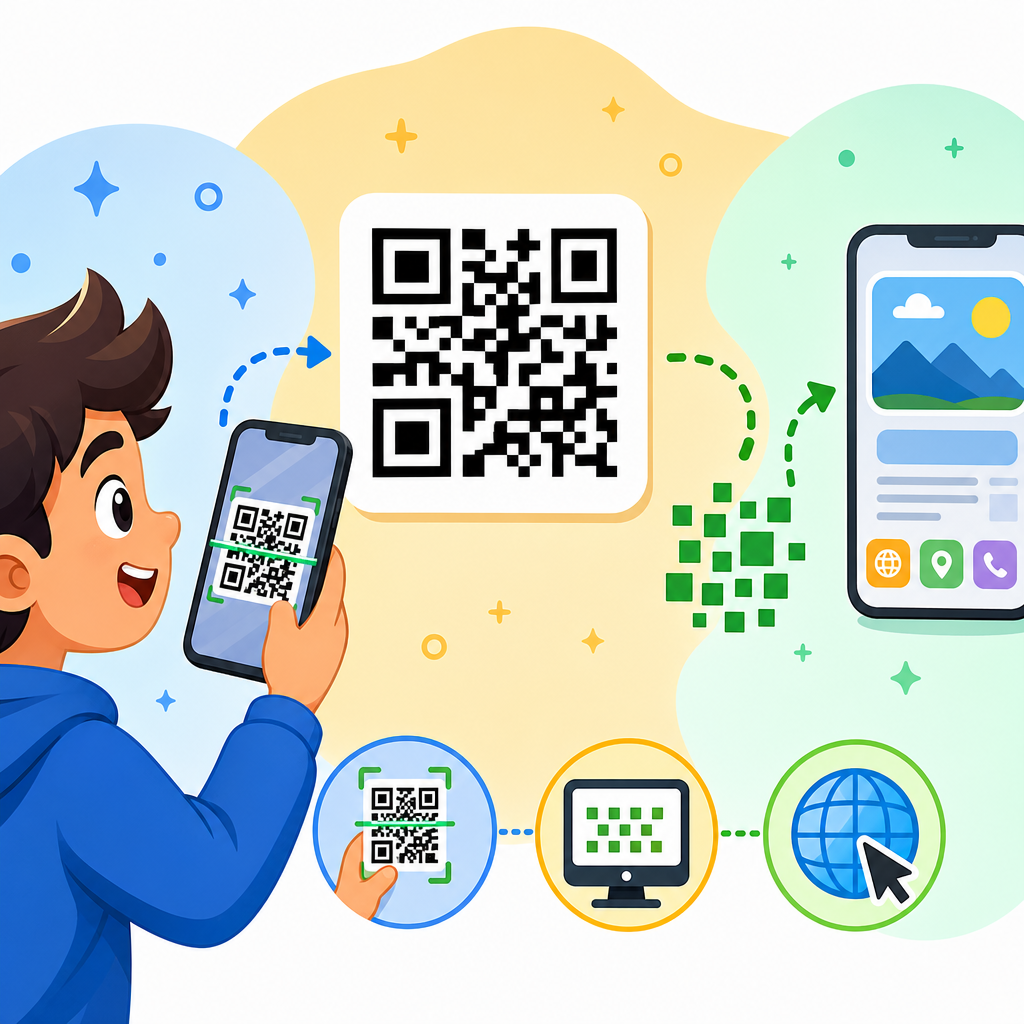
QR codes are small square patterns that store information in a format cameras can read quickly, making them one of the simplest bridges between printed materials and digital content. If you have scanned a restaurant menu, paid for parking, joined a Wi-Fi network, or opened an event registration page from a poster, you have already used this technology in a practical, everyday way. For beginners, the black-and-white grid can look random, but it follows a strict design that allows phones and scanners to detect, interpret, and act on encoded data within seconds.
A QR code, short for Quick Response code, is a two-dimensional barcode invented in 1994 by Denso Wave, a Toyota subsidiary, to track automotive parts more efficiently. Traditional one-dimensional barcodes store data horizontally in lines of varying widths. A QR code stores data both horizontally and vertically, which is why it can hold far more information in a smaller space. Depending on the type of data and the level of error correction used, a single code can contain text, numbers, web addresses, contact details, payment strings, or app deep links.
This matters because QR codes remove friction. Instead of typing a long URL, manually entering a coupon code, or searching for a product page, a user points a camera and gets instant access. In my own work with retail displays, onboarding documents, and trade show materials, I have seen response rates improve simply because the next step became easier. That convenience explains why QR codes became mainstream during the pandemic and stayed relevant afterward. They are cheap to produce, easy to update when built dynamically, and compatible with nearly every smartphone on the market.
To understand how QR codes work, it helps to define a few key terms. Encoding is the process of converting data, such as a URL, into the square grid pattern. Decoding is the reverse process, where a scanner reads the pattern and reconstructs the original data. Modules are the tiny black or white squares inside the code. Error correction is the built-in redundancy that lets a code still work even if part of it is dirty, scratched, or covered by a logo. Static codes store fixed information directly in the pattern, while dynamic codes point to a short redirect URL that can be changed later without replacing the printed code.
Because this page serves as a foundation for QR code basics, it covers both what QR codes are and how they function in plain language. You will learn the parts of a QR code, what happens during a scan, the most common use cases, the difference between static and dynamic QR codes, and the practical design rules that determine whether a code scans reliably. By the end, the pattern should feel less mysterious and far more useful as a tool for education, marketing, operations, and customer experience.
What a QR code is and why its design looks unusual
A QR code is a machine-readable symbol made of small modules arranged on a square grid. Unlike a standard barcode that usually holds a product number linked to a database, a QR code can carry the actual data itself. That data may be a web address, plain text, a phone number, a vCard contact record, map coordinates, a calendar event, or payment information. The code looks unusual because every visible section has a job. It is not random artwork. It is structured data plus orientation markers and correction patterns that help scanners read it from different angles and in imperfect conditions.
The three large squares in the corners are called finder patterns. They tell a scanner where the code begins and help it determine orientation, even if the code is tilted. Smaller alignment patterns, timing patterns, and a quiet zone around the edges help the camera separate the code from the background and map the grid accurately. This is why designers who crowd a QR code too tightly against text or put it over a noisy image often create scanning issues. The code needs visual breathing room and enough contrast to be recognized by software before the data can be decoded.
QR codes also come in versions, which define the dimensions of the grid. Version 1 is 21 by 21 modules, and each higher version adds four modules per side. More data means a larger version, though smart encoding and shorter content keep the symbol smaller and easier to scan. Error correction levels are standardized as L, M, Q, and H, roughly allowing recovery of 7 percent, 15 percent, 25 percent, or 30 percent of damaged data. Higher error correction improves resilience but increases complexity and can make the code denser, so there is always a tradeoff between durability and simplicity.
How QR codes work when you scan them
When you open a smartphone camera or scanning app and point it at a QR code, the software first looks for the finder patterns that identify the symbol. Once detected, the app corrects perspective distortion, estimates the grid size, and converts the visual pattern into binary data. In plain terms, the scanner figures out which squares are black, which are white, and how those positions map to encoded characters or commands. The result may be a website prompt, a contact card, a payment request, or another supported action, depending on the content type.
The process happens quickly because modern phone cameras and image-processing libraries are strong at pattern recognition. Apple integrated QR support into the iPhone camera years ago, and Android devices do the same through native camera apps or Google Lens. Dedicated scanners used in warehouses, logistics, and manufacturing are faster and more tolerant of harsh conditions, but for most consumer uses a smartphone is enough. In field testing, I have found that lighting, print quality, and size matter more than the phone model. Even an older device can scan well if the code has good contrast, a proper quiet zone, and a reasonable physical size.
One detail beginners often miss is that a QR code does not need the internet to be read. The image is decoded locally by the device. Internet access is only required if the encoded action depends on an online destination, such as opening a webpage or fetching a digital menu. If the code contains plain text or a Wi-Fi configuration string, the phone can still interpret it offline. That distinction matters for environments with weak connectivity, such as underground transit stations, event venues, industrial sites, or rural locations where an offline-capable action may work better than a web-only experience.
Main types of QR codes and what they are used for
Beginners usually encounter QR codes as website links, but the format supports many data types. URL QR codes open landing pages, product detail pages, forms, or videos. vCard QR codes save contact information directly into a phone’s address book. SMS and email QR codes prefill recipient details and message text. Wi-Fi QR codes let guests join a network without typing a long password. Payment QR codes can initiate transactions through systems like UPI, Alipay, or merchant wallet apps. App store QR codes send users to the correct iOS or Android destination, while event QR codes can hold ticket IDs or registration data.
These different uses explain why QR codes appear across so many industries. Restaurants use them for menus and ordering. Hospitals use them for patient information access and asset tracking. Manufacturers use them on components because they store more data than linear barcodes and stay readable despite partial damage. Real estate agencies place them on signs to send buyers to listing pages. Museums use them to attach multilingual interpretation to exhibits. In B2B settings, I have seen QR codes streamline equipment maintenance by linking directly to service manuals, inspection logs, and spare-part catalogs at the exact point of need.
| QR code type | What it does | Common example |
|---|---|---|
| URL | Opens a webpage or app link | Poster linking to an event page |
| vCard | Saves contact details | Business card with phone and email |
| Wi-Fi | Joins a wireless network | Hotel lobby guest access |
| Payment | Starts a payment flow | Cafe countertop checkout |
| Text | Shows plain written content | Equipment label with instructions |
Static versus dynamic QR codes
A static QR code contains the final data directly in the symbol. If it encodes a URL, that URL is fixed forever once printed. Static codes are useful for information that will not change, such as a permanent company homepage, a plain text message, or a long-term contact record. They are simple, often free to generate, and do not depend on a third-party management platform to keep working. The downside is inflexibility. If the destination changes, the printed material must be replaced, which can become expensive for packaging, signage, brochures, labels, or product inserts already in circulation.
A dynamic QR code usually contains a short redirect URL managed through a QR platform. When someone scans it, the platform forwards the user to the current destination. That means you can update the landing page later without changing the printed code. Dynamic systems also support scan analytics such as total scans, location by IP estimate, device type, time of day, and campaign tagging. For marketing teams, event organizers, and multi-location businesses, that flexibility is significant. I generally recommend dynamic QR codes for campaigns, menus, PDF downloads, and anything tied to evolving content or measurable performance.
There are tradeoffs. Dynamic QR codes rely on the provider’s infrastructure, so platform reliability, redirect speed, privacy practices, and subscription terms matter. If a service is shut down or a paid plan expires, the code may stop routing correctly. Static codes avoid that risk but lack management features. A practical rule is simple: use static codes for stable, low-risk information and dynamic codes for anything that may change or needs reporting. That distinction is one of the most important basics because it affects cost, longevity, governance, and user experience from the moment a code is created.
Why some QR codes scan instantly and others fail
Most QR code problems come from design and implementation mistakes, not from the technology itself. The first rule is contrast. Dark modules on a light background work best because scanners distinguish the pattern more reliably. Black on white is ideal, while pale colors, metallic inks, glossy reflections, or busy photographic backgrounds reduce readability. The second rule is size. A tiny code on a product label may look neat but become difficult to scan at normal distance. As a working guideline, the scanning distance should be about ten times the printed width of the code.
Quiet zone is another critical factor. This is the empty margin around the code, usually at least four modules wide. Without it, the scanner may struggle to tell where the pattern ends and surrounding text or graphics begin. Error correction also affects performance. If you plan to place a logo in the center, print on curved packaging, or expect wear and tear, using a higher error correction level can preserve scanability. However, increasing correction makes the code denser, so it is still wise to keep the encoded content short, especially for physical applications where print area is limited.
Testing matters more than aesthetics. Before approving a print run, scan the code on multiple phones, under bright and dim lighting, from realistic distances, and after exporting the artwork to its final file format. Problems often appear when a code is resized poorly, blurred in a low-resolution image, or compressed inside a design tool. I have also seen campaigns fail because the destination page was slow, not mobile-friendly, or blocked by a login wall. A successful QR experience includes both the code and the page behind it. If the destination is weak, scanning convenience does not save the campaign.
Security, privacy, and beginner best practices
QR codes are useful, but they should be approached with the same caution as links in email or text messages. A malicious QR code can send users to a phishing page, trigger a deceptive download, or open a spoofed payment request. Because the pattern is not human-readable, users cannot judge the destination by looking at it. Most smartphone cameras now show the URL before opening it, which helps, but organizations should still use branded domains, secure HTTPS pages, and clear context around why the code is there. Trust improves when the user understands the expected outcome before scanning.
For businesses, the best practice is to pair QR codes with a plain-language label such as “Scan to view menu,” “Scan to download warranty guide,” or “Scan to pay.” That instruction sets expectations and increases scan rate. It also reduces accidental misuse because users can compare the action with the visual context. From a privacy standpoint, dynamic QR analytics can be valuable, but teams should avoid collecting more data than needed and should disclose tracking where required by law or policy. If the destination uses forms, cookies, or app installs, normal privacy and consent standards still apply.
The key takeaway for beginners is simple: QR codes work by encoding data into a two-dimensional grid that cameras can recognize, correct, and decode quickly. Their power comes from speed, flexibility, and broad smartphone support, but reliable results depend on smart choices about data type, code format, design, and destination quality. If you are learning QR code basics, start by understanding what the code contains, whether it should be static or dynamic, and how it will be used in the real world. Then test it exactly as your audience will encounter it. That practical approach prevents most failures.
As the hub page for QR Code Basics & Education, this overview should give you a solid foundation for every related topic, from generating your first code to choosing the right use case for marketing, operations, payments, and customer support. QR codes are not complicated once the parts are explained plainly: they are structured visual data designed for fast camera reading. Use them with clear intent, good design discipline, and a trustworthy destination, and they become one of the simplest tools for connecting offline attention to online action. Next, explore the supporting guides in this section and apply the basics to your own project.
Frequently Asked Questions
What is a QR code, and what information can it store?
A QR code, short for Quick Response code, is a two-dimensional barcode made of small black-and-white squares arranged in a grid. Unlike traditional barcodes that store data in one direction, a QR code stores information both horizontally and vertically, which allows it to hold much more data in a compact space. That is why a small printed square can connect you to a website, display contact details, open a payment screen, start a phone call, or even help a device join a Wi-Fi network automatically.
The information inside a QR code is usually not the full web page, menu, or app itself. Instead, it often contains a short piece of data such as a URL, a text message, a phone number, an email address, or login details. When you scan it with a smartphone camera or QR scanner, your device reads that stored data and performs the related action. In simple terms, the QR code is a fast, scannable container for digital instructions that helps connect physical objects like signs, packaging, menus, and tickets to online content.
How does a phone camera actually read a QR code?
When you point your phone camera at a QR code, the device first detects the code’s shape and position within the image. QR codes include special square markers, usually found in three corners, that help the scanner recognize that it is looking at a QR code rather than a random pattern. These markers allow the phone to figure out the orientation of the code, even if it is tilted, printed at an angle, or viewed from the side.
After locating the code, the phone analyzes the tiny black-and-white modules, which are the individual squares in the grid. Each square represents part of the encoded data. The scanner converts that visual pattern into binary information, then decodes it according to QR code rules and error-correction standards. This process happens in a fraction of a second, which is why scanning feels instant. Once the data is decoded, the phone shows the result, such as a web link, digital menu, payment page, or event registration form, and asks whether you want to open it.
Why do QR codes look random if they follow a strict design?
To beginners, a QR code often looks like a random collection of black and white squares, but it is actually built using a highly organized structure. Certain areas of the code have fixed purposes. The large squares in the corners help the scanner find the code quickly. Other sections provide alignment information, define the format, and support error correction. The remaining modules carry the actual data being stored. So while the code may appear chaotic, every part has a job.
The reason it looks random is that the encoded information is converted into a machine-readable pattern rather than something humans are meant to interpret visually. Similar to how a password or compressed file can look meaningless to a person but useful to a computer, a QR code is designed for speed and reliability in scanning, not for human readability. That structured design is what makes QR codes so effective in real-world settings, from restaurant tables to bus stops to product packaging.
Can a QR code still work if part of it is damaged or hard to scan?
Yes, one of the most useful features of QR codes is that they include error correction. This means the code can often still be read even if part of it is smudged, scratched, wrinkled, or partly covered. The scanner uses built-in recovery data to reconstruct missing or damaged sections. That is one reason QR codes are so practical for posters, labels, receipts, packaging, and outdoor signage, where wear and tear are common.
However, there are limits. If too much of the code is damaged, printed too small, blurred, poorly lit, or distorted, scanning may fail. Good QR code design matters a lot. The code should have enough contrast, usually black on white, adequate size, and some empty space around it so the scanner can detect it easily. In other words, QR codes are forgiving, but they still work best when they are printed clearly and placed where a camera can capture them without obstruction.
Are QR codes safe to use, and what should beginners watch out for?
QR codes themselves are not dangerous, but the content they link to can be. A QR code is simply a method of storing information, so its safety depends on where it sends you or what action it triggers. Most everyday QR codes are harmless and useful, such as those used for menus, payments, tickets, Wi-Fi access, product information, and event registration. The risk comes when a code leads to a malicious website, fake payment page, or scam form designed to collect personal information.
Beginners should treat QR codes the same way they treat links in emails or text messages. Before opening the result, check whether your phone shows a preview of the destination. Be cautious with codes placed on public stickers, parking meters, flyers, or signs that could have been replaced or covered by someone else. If the web address looks suspicious, misspelled, or unrelated to the business you expected, do not continue. Using your phone’s built-in camera scanner is usually safer than installing unknown scanning apps, and keeping your device updated adds another layer of protection. In short, QR codes are generally safe and extremely useful, but a quick moment of caution is always smart.





