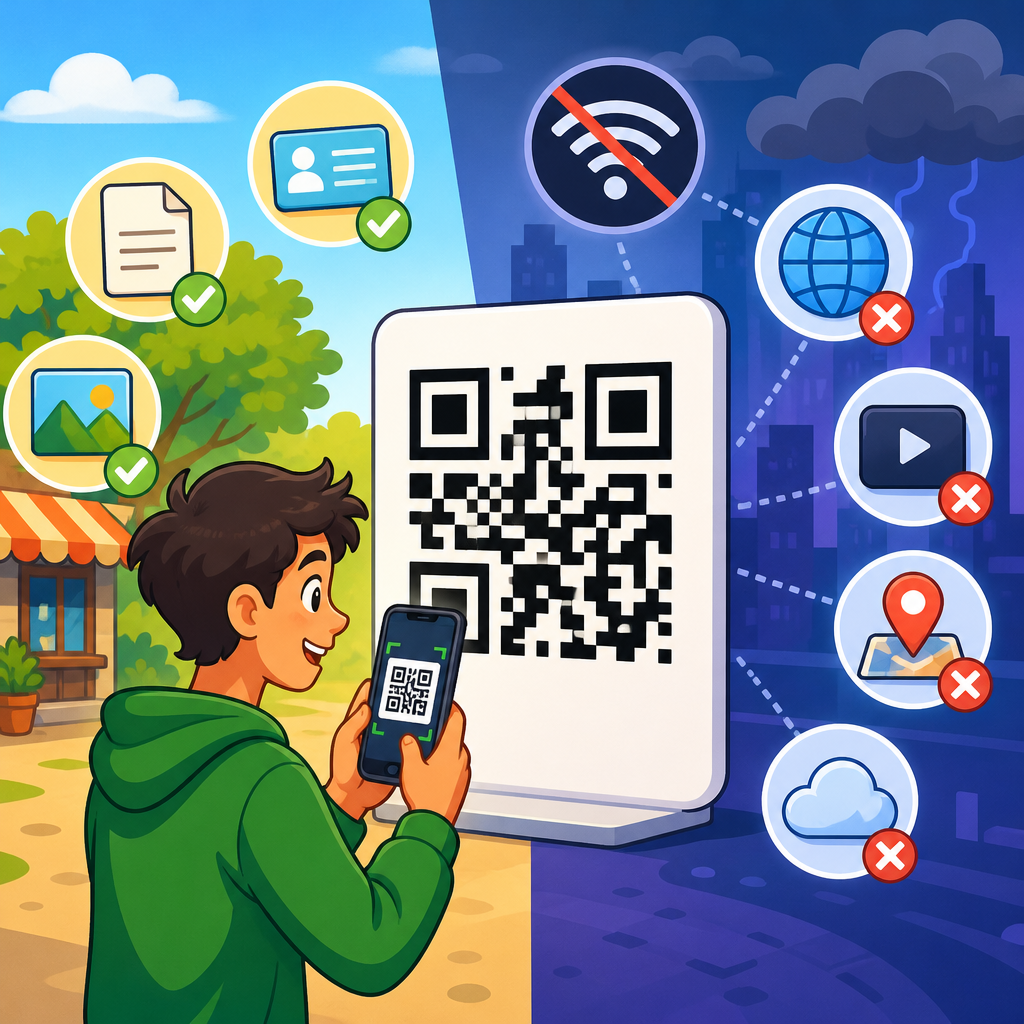
QR codes can work without internet, but whether a scan does anything useful offline depends entirely on what the code contains and what the scanning device is expected to do after reading it. In practical terms, a QR code is just a machine-readable pattern that stores data, and scanning is the act of decoding that pattern into text, a link, or another payload. Internet access is only required when the decoded content points to an online resource, such as a website, video, cloud file, or app store listing. That distinction matters because many people assume the black-and-white square itself somehow “uses the internet,” when in fact the code is static and the connection question applies to the destination, not the symbol.
As someone who has deployed QR codes for retail packaging, trade show booths, equipment labels, restaurant menus, and offline event check-in, I have seen the same confusion repeatedly. Teams print thousands of labels without deciding whether the user will have mobile service, then wonder why scans fail in a warehouse, basement, stadium concourse, or airplane cabin. A solid understanding of what QR codes are, what data they hold, and what can be read locally helps prevent that mistake. It also improves campaign design, because a code intended for offline use should be built differently from one intended to drive web traffic or attribute conversions.
This article serves as a hub for QR code basics and education by answering the core questions directly: what a QR code is, how it works, whether it needs internet, what can scan offline, what does not, and how to choose the right format for real-world use. If you need the short answer, here it is: any QR code whose payload can be interpreted entirely on the device can be scanned offline; any QR code that requires fetching remote content cannot complete its purpose without connectivity. The rest of the article explains the mechanics, edge cases, and best practices behind that rule.
What Are QR Codes and How Do They Actually Work?
A QR code, short for Quick Response code, is a two-dimensional matrix barcode invented by Denso Wave in 1994 for high-speed tracking in manufacturing. Unlike a traditional one-dimensional barcode, which stores data across horizontal lines, a QR code stores data in both horizontal and vertical directions. That structure allows it to hold significantly more information in a small space. A standard QR code can encode numeric, alphanumeric, byte, or Kanji data, and it includes finder patterns, alignment patterns, timing patterns, format information, and error correction data that help scanners decode the symbol even if part of it is damaged.
The scanning process is straightforward. A smartphone camera or dedicated scanner captures the symbol as an image. Decoder software identifies the three large corner finder patterns, corrects perspective, samples the modules, applies the mask pattern rules, and reconstructs the encoded payload. Reed-Solomon error correction then helps recover data if the symbol is dirty, scratched, or partially obscured. None of those steps require the internet. They happen locally on the device. That is why a phone can usually read a QR code in airplane mode and still display what was encoded inside it.
What the user sees after scanning depends on the payload type. If the QR code contains plain text, the scanner shows text. If it contains a telephone number in a tel: URI, the phone offers to dial. If it contains Wi-Fi credentials in the standard WIFI: format, the phone can prompt the user to join a network. If it contains a URL, the scanner opens the browser. At that point, the browser needs internet to load the page unless the page is already cached locally, which is rare and not something to rely on operationally.
Can a QR Code Work Without Internet? The Direct Answer
Yes, a QR code can absolutely work without internet, because scanning and decoding are local device functions. The more accurate question is whether the action triggered by the decoded content also works offline. In my projects, I separate QR use cases into two buckets: self-contained payloads and network-dependent payloads. Self-contained payloads include text, contact cards, calendar data, SMS drafts, phone numbers, and Wi-Fi network credentials. Network-dependent payloads include websites, payment links, PDF downloads stored online, social profiles, map directions pulled from web services, and app download pages.
This distinction explains why two QR codes can produce completely different outcomes in the same offline environment. A maintenance technician in a factory can scan a QR code on a machine and instantly read a locally encoded service checklist without connectivity. The same technician cannot scan a different QR code and open a cloud-hosted maintenance manual unless the device has internet access. The symbol is not the deciding factor; the payload is.
Another source of confusion is dynamic QR codes. A static QR code directly contains the final payload, such as a URL or text string. A dynamic QR code usually contains a short redirect URL controlled by a QR platform, which then forwards the user to a destination that can be changed later and tracked. Dynamic codes are useful for analytics, but they are inherently more dependent on connectivity because the redirect itself must resolve online before the user reaches the final content.
What Scans Offline and What Does Not
The simplest way to evaluate offline behavior is to ask whether the phone can fully interpret and use the data without contacting a server. If the answer is yes, the QR experience can work offline. If the answer is no, the scan may decode but the intended action will stall. The table below reflects the behavior I generally see across current iPhone and Android camera apps, though exact prompts vary by operating system and scanner application.
| QR code content | Scans offline? | What happens without internet | Typical use case |
|---|---|---|---|
| Plain text | Yes | Text displays immediately on device | Instructions, serial data, internal notes |
| Phone number | Yes | Dial prompt appears, but calling needs cellular service | Support hotlines, sales numbers |
| SMS draft | Yes | Message draft opens, but sending needs service | Lead capture, help requests |
| Email draft | Yes | Mail app opens with fields filled, but sending needs internet | Customer service, inquiries |
| vCard/contact | Yes | Contact can be saved locally | Business cards, staff directories |
| Calendar event | Yes | Event details can be added locally | Conferences, appointments |
| Wi-Fi credentials | Yes | Device can join local Wi-Fi network | Guest access, events, hotels |
| URL/website link | Decodes yes, completes no | Browser opens, page fails without internet | Landing pages, forms, menus |
| App store link | Decodes yes, completes no | Store page cannot load offline | App downloads, loyalty programs |
| Cloud PDF or video | Decodes yes, completes no | Remote file cannot load offline | Manuals, brochures, demos |
| Payment link | Decodes yes, completes no | Checkout service cannot process offline | Donations, retail payments |
One nuance is that “scans offline” can mean two different things: the code is decoded, or the full user goal is completed. A URL QR code usually decodes offline, because the scanner can read the characters in the link. But if the goal is viewing the website, the experience still fails. For decision-making, always judge success by the intended outcome, not by whether the camera recognized the symbol.
Common QR Code Types Explained in Plain Terms
Understanding QR payload types makes it easier to predict behavior and choose the right implementation. The most familiar type is the URL QR code, which simply stores a web address. It is popular because it is flexible, measurable, and easy for users to understand, but it is internet-dependent. A text QR code stores raw text, often used for short instructions, inventory descriptions, or emergency procedures. Because the text lives inside the symbol itself, it is one of the most reliable offline formats.
Contact QR codes usually store data as vCard or MeCard. When scanned, the phone can create a new contact with a name, company, phone number, email, and address. This is useful at networking events because it avoids manual typing and still works in poor coverage areas. Wi-Fi QR codes encode the network name, password, and encryption type using a standard string pattern supported by many mobile devices. In hospitality and events, these are among the most practical offline-friendly QR codes because they help users get connected in the first place.
Other formats include SMS, email, geolocation, and calendar event QR codes. A geolocation QR may open a maps app with coordinates, but rich navigation often still depends on map data and live routing access. Calendar event QR codes can create a local event entry with date, time, and location details. In my experience, they work well for printed invitations because the core information can be stored directly in the code, avoiding a web step.
Static vs Dynamic QR Codes: Why the Difference Matters Offline
Static and dynamic QR codes are often presented as a marketing choice, but they also have operational consequences. A static QR code contains the final payload permanently. If you print a static text QR with safety instructions, that exact text is available offline forever unless you reprint the code. This makes static codes dependable for fixed, self-contained information. The tradeoff is that they cannot be edited after printing, and static URL codes offer limited analytics because there is no redirect layer collecting scan data.
A dynamic QR code points to a managed short URL that redirects to another destination. Platforms such as Bitly, QR Code Generator, Beaconstac, Scanova, and Flowcode use this model because it enables editing the destination, A/B testing, scan counts, device breakdowns, location estimates, and campaign governance. However, dynamic codes add a dependency: the redirect service must be reachable. In a no-signal environment, even the redirect step cannot complete. That makes dynamic codes a poor fit when guaranteed offline access is a requirement.
When I plan a deployment, I use a simple rule. If the information must be available in a basement, plant floor, rural field site, aircraft cabin, or disaster response scenario, I encode the essential data directly in the symbol or provide a local-network destination. If the priority is flexibility and measurement, I use dynamic web-based QR codes and accept the connectivity requirement. Trying to make one code serve both goals usually creates frustration.
Real-World Examples of Offline and Online QR Code Use
Consider a museum storing exhibit summaries in text QR codes beside artifacts. Visitors can scan and read short descriptions even where reception is weak. If the museum instead uses QR codes that open multimedia pages with audio and video, the experience becomes richer but now depends on mobile data or venue Wi-Fi. In retail, a product package might include a QR code for ingredients, care instructions, or multilingual setup text encoded directly for offline access, while a separate code sends shoppers to reviews or reorder pages online.
Manufacturing and field service offer some of the clearest examples. I have implemented QR labels on equipment that encode asset IDs, maintenance intervals, and emergency stop procedures as local text. Technicians can scan these in concrete facilities where cellular coverage is unreliable. When deeper documentation is required, the QR can also reference an internal CMMS or document management system, but then the company needs local network coverage or cached files. Offline expectations must be defined upfront.
Transportation is another useful case. Airlines and rail operators often use QR codes for boarding passes because the code itself stores validation data readable by the gate scanner. The passenger does not need internet at the moment of scanning if the pass is already saved on the device. By contrast, a QR code printed on an ad in an airport that links to a booking site is effectively useless offline. The same symbol type supports both workflows, but only one is self-contained.
Best Practices for Choosing the Right QR Code for the Job
Start by identifying the exact user task. Do users need to read information, save a contact, join Wi-Fi, prove entitlement, open a web page, or complete a purchase? The answer determines whether offline capability is possible. If the task must succeed without connectivity, keep the payload self-contained and brief enough for reliable scanning at an appropriate error correction level. If online content is unavoidable, make the physical placement coincide with known connectivity, provide fallback instructions, and keep landing pages lightweight.
Test with native camera apps on current iPhone and Android devices, not just with a third-party scanner. Native behavior now drives most scans. Verify contrast, quiet zone spacing, print size, and viewing distance. ISO/IEC 18004 defines the QR Code symbology specification, and following established print and contrast standards reduces failures that users mistakenly attribute to internet issues. For critical operations, test in the actual environment, including low light, reflective surfaces, curved packaging, and no-signal conditions.
Avoid putting too much data into a single static QR code. Higher data density increases module complexity and can make small printed codes harder to scan. For offline instructions, concise text often performs better than cramming in a long document. If you need rich offline content, consider whether a local app, wallet pass, or on-device file distribution method would serve users better than a QR code alone.
QR codes do not inherently need internet; they need only a camera and decoder to reveal the data stored in the symbol. Internet becomes necessary when the destination lives online, which is why a text, contact, Wi-Fi, or calendar QR can work offline while a website, payment page, or cloud-hosted PDF cannot complete its purpose without connectivity. That single principle answers most questions people have about offline QR behavior and helps prevent poor implementation choices.
The broader lesson for anyone learning QR code basics is that a QR code is not a magic shortcut. It is a container for data, and the user experience depends on the payload, the scanner, and the environment. Static and self-contained formats are best when reliability matters in low-signal settings. Dynamic and web-based formats are best when you need editability, analytics, and richer content. Both are valid, but they solve different problems.
If you are building a QR strategy for packaging, events, operations, or marketing, map each code to the real-world conditions in which it will be scanned. Decide what must work offline, encode only what users actually need, and test before printing at scale. That approach produces QR codes that are not only scannable, but genuinely useful.
Frequently Asked Questions
Can a QR code be scanned without an internet connection?
Yes. A QR code can absolutely be scanned without internet because the scanning process itself is just the act of reading and decoding the black-and-white pattern. The scanner, whether it is a phone camera app, a dedicated QR reader, or another device, can interpret the code locally and reveal the stored data without needing to go online first. In that sense, the QR code does not depend on internet access to “work” at the basic decoding level.
What matters is what happens after the scan. If the QR code contains plain text, contact information, a Wi-Fi configuration, calendar details, a serial number, or another self-contained payload, the scan can still be useful offline because the device can display or save that information immediately. If the QR code contains a web address or points to content hosted online, the device may successfully read the code but will not be able to open the destination until internet access is available. So the right way to think about it is this: scanning can happen offline, but the usefulness of the result depends on whether the decoded content requires the internet.
What types of QR code content usually work offline?
Offline-friendly QR codes are the ones that store complete information directly inside the code rather than pointing somewhere on the web. Common examples include plain text, phone numbers, email addresses, SMS drafts, vCard contact details, calendar events, and Wi-Fi network credentials. In these cases, the scanning device can decode the information and either display it to the user or hand it off to a built-in app, all without contacting an external server.
For example, a QR code containing a person’s contact card can be scanned on a phone with no data connection, and the user can still choose to save that contact. A Wi-Fi QR code can work offline as well because the phone is reading the network name and password directly from the code; it does not need internet to attempt the connection itself. Similarly, a QR code used in inventory, ticketing, manufacturing, classrooms, or internal operations can function offline if the scanning app is designed to interpret the embedded data locally. The key principle is simple: if all required information is already inside the QR code and the device knows what to do with it, internet is not necessary.
What kinds of QR codes do not fully work offline?
QR codes that point to online destinations do not fully deliver their intended result without internet access. The most common example is a QR code containing a URL. A phone can scan and recognize the link perfectly well offline, but it cannot load the webpage until the device regains internet access. The same limitation applies to codes linking to cloud documents, online videos, social media pages, restaurant menus hosted on a website, app store listings, payment portals, and web-based forms.
This also applies to many so-called “dynamic” QR codes, especially those managed through QR platforms that use a short redirect URL. Even though the code scans, the redirect process usually depends on a live internet connection to send the user to the final destination. If the internet is unavailable, the user may see the link text, but the redirect and destination content will not open. In other words, these codes are still readable offline, but their purpose cannot be completed offline because the useful content lives somewhere on the internet rather than inside the code itself.
Does a dynamic QR code work without internet the same way a static QR code does?
Not usually. A static QR code stores the final content directly in the code itself, such as text, a phone number, or a fixed URL. Because the payload is embedded right there, the scanner can decode it offline. Whether the result is useful then depends on the payload. If it is plain text, it works fully offline. If it is a website address, it is readable offline but the site will not open until the device is online.
A dynamic QR code generally behaves differently because it often contains a short tracking or redirect link rather than the final content. That means the scan may still decode offline, but the code’s main advantages, such as editable destinations, analytics, redirects, conditional routing, or scan tracking, rely on a server connection. Without internet, the scanner cannot reach that server to resolve the redirect and deliver the intended experience. So from a practical standpoint, static codes are more likely to be useful offline, while dynamic codes are more dependent on internet access for their full functionality.
How can you make a QR code useful in offline situations?
The best approach is to match the QR code content to the environment where it will be scanned. If people may have weak or no connectivity, avoid relying entirely on web links for essential information. Instead, embed as much critical data as possible directly into the code or use a scanning system that can process the payload locally. For example, event check-ins, product identification, equipment setup instructions, emergency contacts, internal asset tags, and Wi-Fi access are all situations where offline-capable QR codes can be especially effective.
It also helps to think about the scanning device and app, not just the code itself. A QR code may contain offline-friendly data, but the app still needs to know how to interpret it and present a useful action. In business or industrial settings, custom apps can be designed to validate, log, or act on scanned data without internet and then sync later when connectivity returns. If your use case requires opening videos, forms, cloud files, or websites, consider providing a fallback such as printed instructions, a short text summary, or a code that stores core information directly. In short, QR codes can be very reliable offline, but only when the content and scanning workflow are designed with offline use in mind.